
Retry queue vs dead-letter queue: the short answer
A retry queue temporarily holds a failed message before another processing attempt. After a delay, the message goes back to the work queue automatically.
A dead-letter queue (DLQ) holds messages that should no longer be processed normally. Nothing sends them back automatically: they wait until someone inspects them, fixes the cause, and replays or discards them.
In other words, a retry queue answers "try again later", and a DLQ answers "stop, someone needs to look at this". They are not alternatives: most production setups use both. Failed messages go through a few retries first, and only the ones that still fail, or that could never succeed, end up in the DLQ.
This article is about deciding where a failed message should go and what should happen to it next. To build each piece, see the RabbitMQ retry pattern, RabbitMQ exponential backoff and properly setting up dead-letter queues guides.
Retry queue vs DLQ at a glance
| Retry queue | Dead-letter queue | |
|---|---|---|
| Purpose | Wait before another attempt | Park messages that failed for good |
| Is the message processed again? | Yes, automatically | Only if someone replays it |
| Delay | Yes, that's the point | No, messages stay until handled |
TTL (x-message-ttl) | Required, it defines the delay | Usually none, or a long retention TTL |
| Dead-letter exchange | Points back to the work queue | Usually none |
| Consumer | None | None, or a monitoring / replay tool |
| Retry count | Read on every attempt to pick the next step | Final value, explains how the message got there |
| Typical next destination | The work queue | Investigation, then replay or discard |
| Healthy size | Small, fluctuating | Empty |
| A growing queue means | A dependency is struggling | Messages are escaping normal processing |
The confusing part is that both are built with the same RabbitMQ feature: dead-letter exchanges. A retry queue is technically a queue whose messages get dead-lettered on purpose when their TTL expires. The difference is not in the mechanism but in the role: a retry queue is a waiting room, a DLQ is a final destination.
How a RabbitMQ retry flow works
Here is how a failed message moves through a system with a retry queue and a DLQ. The key distinction is the way back: from a retry queue, messages return automatically; from a DLQ, they only return manually.
Following one message that keeps failing:
- The consumer receives the message from
work_queueand processing fails with a transient error (a timeout, for example). - The consumer publishes it to
retry_queuewith an incrementedx-retry-countheader, then acks the original. - The message waits in
retry_queue, which has no consumer. When its TTL expires, RabbitMQ dead-letters it towork_exchange, which routes it back towork_queue. - Steps 1 to 3 repeat until processing succeeds, or until
x-retry-countreaches the maximum. - Once retries are exhausted, the consumer publishes the message to
dead_letter_queuewith headers describing the failure. - The message stays in the DLQ until a developer inspects it, fixes the cause, and replays it to
work_exchange.
A message with a permanent error skips steps 2 to 4 entirely and goes straight to the DLQ.
The grey loop in the diagram is the third option, plain requeue, covered below.
When should a message go to a retry queue?
Send a message to a retry queue when the failure is transient: the same message, processed again later without any change, has a good chance of succeeding.
- Temporary network failures: connection resets, DNS hiccups, timeouts.
- A downstream API that is unavailable: HTTP 502, 503 or 504, a deployment in progress.
- A database that is temporarily unavailable: failover, restart, connection pool exhausted.
- Rate limiting: HTTP 429 from a third-party API. Pick a delay at least as long as the
Retry-Afterheader. - Lock contention: deadlocks, lock timeouts, optimistic concurrency conflicts.
- Transient infrastructure failures: a pod restarting, a dependency being scaled, a disk briefly full.
- Ordering issues between services: an event refers to an entity that another service hasn't created yet.
What these have in common is that the cause is outside the message. The message is fine; the world around it isn't ready. Waiting gives it time to recover, and a delay that grows with each attempt avoids hammering a dependency that is already struggling.
Always cap the number of retries. A transient failure that lasts longer than your whole retry schedule isn't transient anymore, and the message should move on to the DLQ.
When should a message go directly to a DLQ?
Send a message straight to the DLQ, without retrying, when the failure is permanent: processing the exact same message again will fail the exact same way.
- Malformed payload: invalid JSON, wrong encoding, truncated body.
- Schema validation errors: missing required field, wrong type, unknown enum value.
- Unsupported message type: a new event type the consumer doesn't know how to handle yet, or an old version it no longer supports.
- Invalid business data: an order with a negative quantity, a reference to an entity that will never exist.
- Permanent processing errors: a bug in the consumer that throws on a specific input, a 400 or 422 from a downstream API.
- Authorization failures: a 401 or 403 that won't fix itself without a configuration change.
Here the cause is in the message, or in the code that processes it. Retrying only delays the inevitable: with a 5s → 15s → 60s schedule, a malformed message wastes four processing attempts and 80 seconds before reaching the DLQ anyway, and adds noise to your retry queues in the meantime.
Not every permanent failure even belongs in the DLQ. If a message is valid but no longer relevant (the order it refers to was cancelled, the user was deleted), acking it and logging the decision is often enough. The DLQ is for messages someone needs to look at.
Quick decision table
| Failure | Retry queue | DLQ | Ack and log |
|---|---|---|---|
| Timeout, connection reset | ✓ | After max retries | |
| HTTP 429, 503 | ✓ | After max retries | |
| Database deadlock | ✓ | After max retries | |
| Invalid JSON, schema error | ✓ | ||
| Unknown message type | ✓ | ||
| Bug in the consumer | ✓ | ||
| HTTP 400, 422 from a downstream API | ✓ | ||
| Message no longer relevant | ✓ |
When you can't tell if an error is transient, retry it. A few unnecessary retries are cheap, losing a message that would have succeeded on the second attempt isn't.
How to combine retry queues and DLQs
A complete, production-ready topology uses three exchanges and at least three queues:
| Resource | Type | Arguments | Role |
|---|---|---|---|
work_exchange | direct | Producers publish here | |
work_queue | Queue | x-dead-letter-exchange: dlx_exchange | Consumed by your application |
retry_exchange | direct | The consumer publishes transient failures here | |
retry_queue | Queue | x-message-ttl: 5000, x-dead-letter-exchange: work_exchange | Holds messages during the delay, no consumer |
dlx_exchange | direct or fanout | The consumer publishes final failures here | |
dead_letter_queue | Queue | Holds final failures, no consumer |
For exponential backoff, replace retry_queue with one queue per delay (retry_5000ms, retry_15000ms, retry_60000ms), as described in the exponential backoff guide.
Two details make this topology robust:
work_queuehas a dead-letter exchange too. It points todlx_exchange, so any message rejected withrequeue=false, by any code path, lands in the DLQ instead of being dropped. It's a safety net, not the main path.- The retry queue dead-letters to
work_exchange, not to the DLQ. That's what makes it a retry queue. If you get this wrong, every "retried" message goes straight to the DLQ after its TTL.
Prefer policies over hard-coded queue arguments for the TTL and dead-letter exchange: queue arguments can't be changed on an existing queue, policies can.
The decision logic in the consumer
The consumer is where a failed message gets its destination. The logic fits in a few lines:
const MAX_RETRIES = 3;

channel.consume("work_queue", async (msg) => {
  if (!msg) return;

  const headers = msg.properties.headers ?? {};
  const retryCount = Number(headers["x-retry-count"] ?? 0);

  try {
    await handle(msg);
    channel.ack(msg);
    return;
  } catch (err) {
    if (isPermanentError(err) || retryCount >= MAX_RETRIES) {
      // Final state: someone needs to look at it
      await republish(msg, "dlx_exchange", "dead", {
        ...headers,
        "x-retry-count": retryCount,
        "x-error": String(err?.message ?? err),
        "x-failed-at": new Date().toISOString(),
      });
    } else {
      // Transient: wait, then try again
      await republish(msg, "retry_exchange", "retry", {
        ...headers,
        "x-retry-count": retryCount + 1,
      });
    }
    channel.ack(msg);
  }
});
isPermanentError encodes the decision table above, and republish publishes a copy of the message on a confirm channel and waits for the broker's confirmation before the original is acked. The exponential backoff guide has the full implementation, including what to do when the republish itself fails.
Republishing instead of using nack matters here: nack can't modify headers, so it can't increment the retry count or attach the error that explains why a message ended up in the DLQ.
How messages can reach a DLQ without your code
Your consumer isn't the only way into a DLQ. Any queue with a dead-letter exchange forwards messages to it in four situations, recorded in the reason field of the x-death header:
x-death reason | Cause |
|---|---|
rejected | A consumer called nack or reject with requeue=false |
expired | The message's TTL expired |
maxlen | The queue hit its x-max-length or x-max-length-bytes limit with overflow: drop-head |
delivery_limit | A quorum queue message exceeded its delivery-limit |
The expired reason is how retry queues work, which is why every retried message carries an x-death entry. Seeing maxlen or delivery_limit on a message in your DLQ tells you it didn't arrive through your retry logic at all, and is usually the first clue when a DLQ fills up unexpectedly.
Retry queue vs DLQ vs requeue
There is a third option for a failed message, and it's the one most consumers start with: requeue it with nack(msg, false, true) or reject(msg, true). Requeue is neither a retry queue nor a DLQ.
| Requeue | Retry queue | Dead-letter queue | |
|---|---|---|---|
| How | nack or reject with requeue=true | Republish to a TTL queue | Republish to the DLQ, or nack with requeue=false |
| Where the message goes | Back into the same queue | A separate waiting queue | A separate parking queue |
| Delay before next attempt | None, redelivered almost instantly | The queue's TTL | None, no automatic attempt |
| Retry count | Only x-delivery-count on quorum queues | Custom header, fully controlled | Final value, kept for investigation |
| Can modify headers | No | Yes | Yes when republishing, no with nack |
| Blocks other messages | Can, the message stays in the work queue | No | No |
| Risk | Infinite loop on a permanent failure | Retry storms if delays are too short | Messages forgotten if nobody watches the DLQ |
| Good for | A consumer shutting down mid-message | Transient failures | Permanent failures, exhausted retries |
Requeue isn't wrong, it's just a narrow tool. It's appropriate when the failure is about the consumer, not the message: the process is shutting down, the consumer was cancelled, or the message was received by an instance that can't handle it right now. For everything else, requeue without a limit creates the classic loop: the message fails, comes back instantly, fails again, and keeps your consumer busy forever.
On quorum queues, the delivery-limit (20 by default since RabbitMQ 4.0) eventually stops that loop and dead-letters the message with reason delivery_limit. That's a useful safety net, but it still retries with no delay at all, so it doesn't replace a retry queue. The message acknowledgment guide covers ack, nack, reject and requeue in detail, and the retry pattern guide explains why requeue loops happen.
How to inspect and replay DLQ messages
A retry queue takes care of itself. A DLQ doesn't: every message in it is waiting for a decision. That decision usually follows the same steps.
- A message arrives in the DLQ. In a healthy system the DLQ is empty, so the first message should trigger an alert. Monitor its message count with the RabbitMQ HTTP API.
- Inspect the message. Look at the payload and the routing key to understand what the message was supposed to do.
- Check the headers.
x-errorandx-failed-attell you why and when it failed,x-retry-counttells you if it went through all retries or was dead-lettered immediately, andx-deathtells you which queue it came from and for what reason. - Decide what to do. If the cause was a bug or an outage that is now fixed, replay the message. If the message itself is invalid, fix it and republish, or discard it.
- Replay. Publish the message back to
work_exchangewithx-retry-countreset to0, so it gets a full set of retries again. Throttle large replays so they don't overwhelm consumers that just recovered.
The RabbitMQ Management UI makes most of these steps hard: "Get messages" only fetches messages from the head of the queue, without filtering, and there is no way to republish a dead-lettered message in one click (see how to browse RabbitMQ messages without consuming them).
RabbitGUI is built for this workflow.
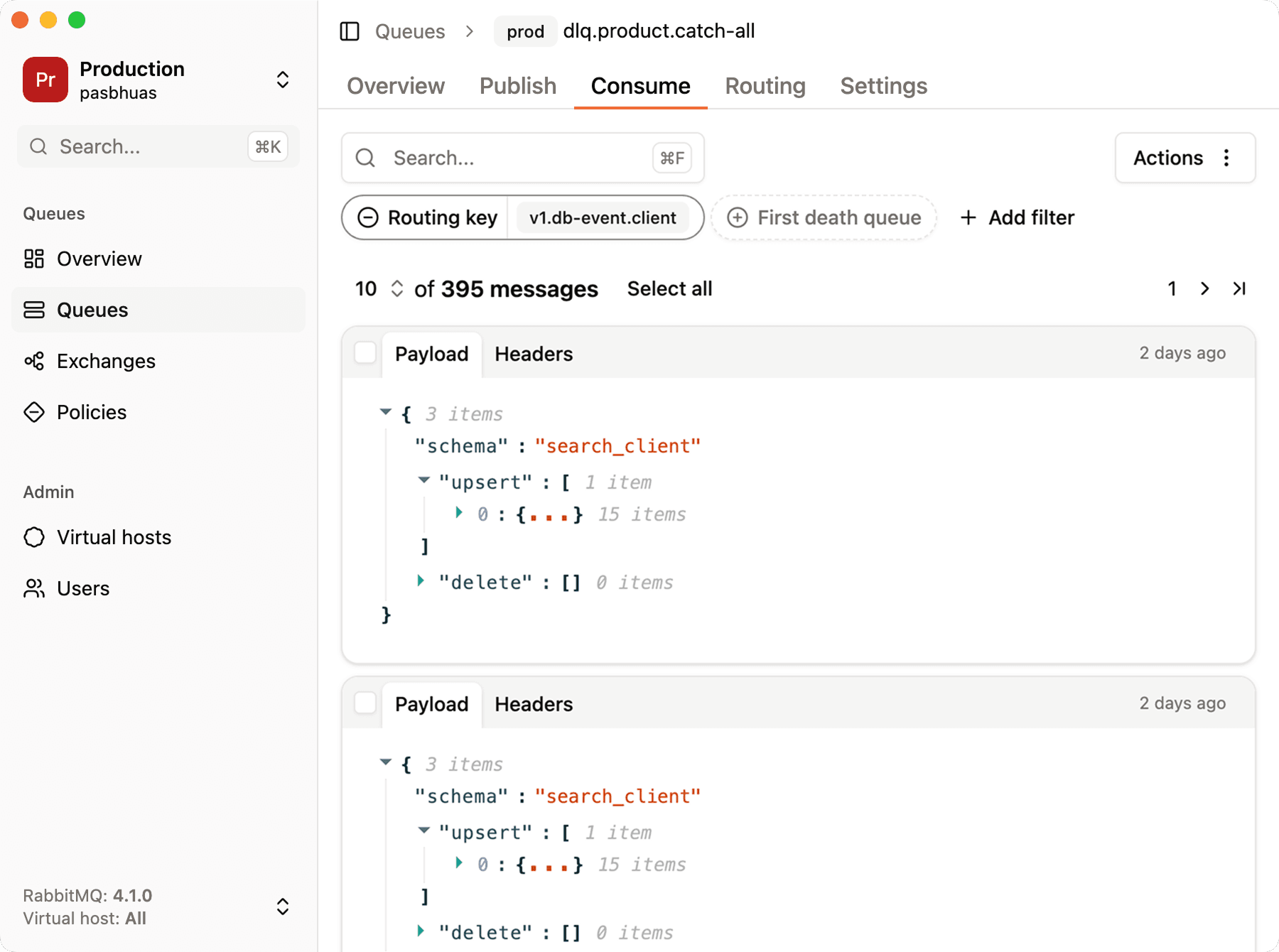
Browse the DLQ without consuming it
Open the dead-letter queue and browse its messages without removing them. Retry queues work the same way: peeking at them shows which messages are currently waiting for another attempt, before anything reaches the DLQ.
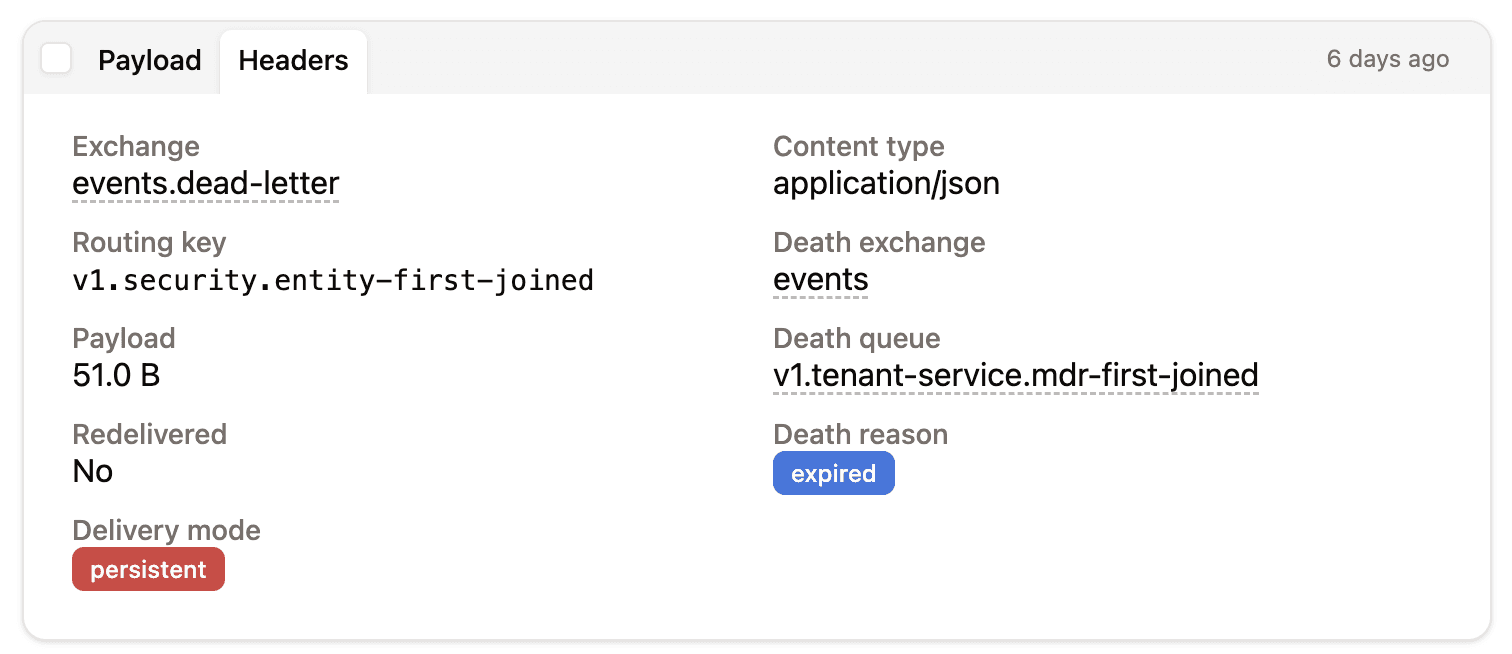
Read the error and retry headers
Open a message and go to the "Headers" tab to see x-retry-count, x-error and the x-death entries RabbitMQ added each time the message was dead-lettered. A message with x-retry-count: 3 and a timeout error exhausted its retries; a message with x-retry-count: 0 and a validation error was dead-lettered on purpose.
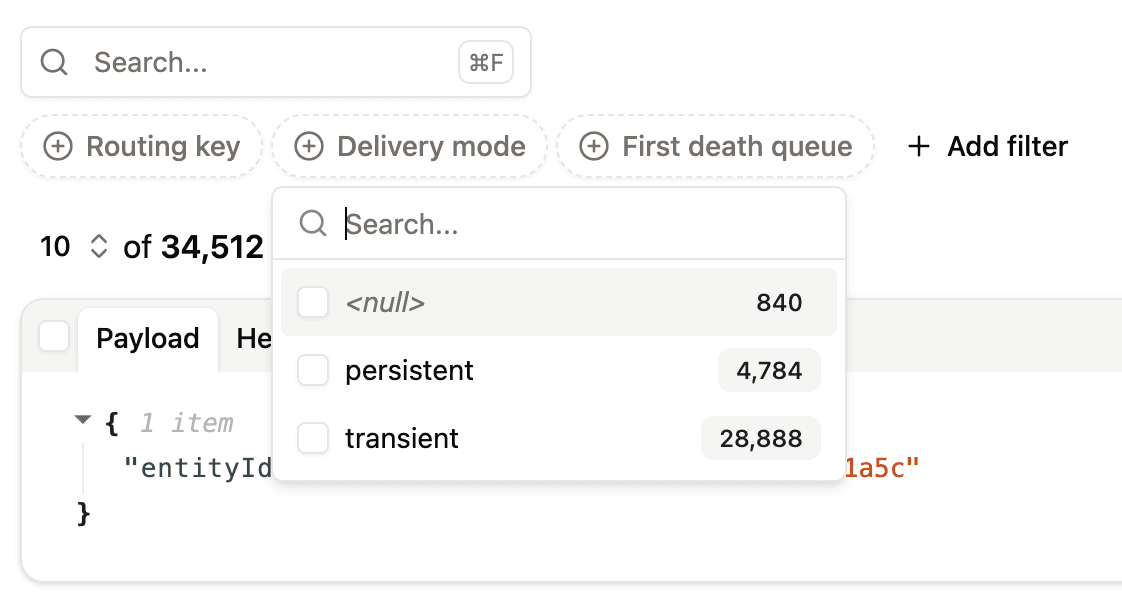
Filter by cause and republish
Filter DLQ messages on any header or on the payload to group them by cause, for example every message with the same x-error. Once the cause is fixed, select them and re-publish them to work_exchange, or to any other exchange and routing key, with throttling to control the replay rate.
For a step-by-step walkthrough, read how to introspect dead-letter queues in RabbitMQ.
FAQ
What is the difference between a retry queue and a dead-letter queue in RabbitMQ?
A retry queue holds a failed message for a delay, then sends it back to the work queue automatically for another attempt. A dead-letter queue holds messages that should no longer be processed normally, and only sends them back when someone replays them manually. Retry queues handle transient failures, DLQs handle permanent failures and exhausted retries.
Is a retry queue a dead-letter queue?
Not in purpose, but they use the same mechanism. A retry queue is configured with a TTL and a dead-letter exchange pointing back to the work queue, so RabbitMQ dead-letters messages out of it when the delay expires. A DLQ is a final destination with no automatic way out.
Should I retry before sending a message to the DLQ?
Only for transient failures, such as timeouts, unavailable dependencies or rate limits. Permanent failures, such as invalid payloads or unsupported message types, should go to the DLQ immediately, since retrying them can't succeed.
How many retries before a DLQ?
Three to five retries is typical. Choose the number and the delays so that the total retry time covers the usual recovery time of the failing dependency, then send the message to the DLQ.
How do I retry messages from a RabbitMQ DLQ?
Inspect the messages, fix the cause, then publish them back to the original exchange with the retry counter reset. RabbitMQ has no built-in replay, so you either write a small script or use a tool like RabbitGUI that can filter DLQ messages and re-publish them with throttling.
Is requeue the same as a retry queue?
No. Requeue (nack or reject with requeue=true) puts the message back in the same queue with no delay and no way to change its headers, so a message that always fails loops forever. A retry queue adds a delay, a retry count and a maximum number of attempts.