RabbitMQ Docker setup
Run RabbitMQ with the management plugin enabled:
docker run -d \
  --name rabbitmq \
  -p 5672:5672 \
  -p 15672:15672 \
  rabbitmq:management
The connexion string is amqp://localhost:5672. Port 5672 is used by client libraries and 15672 by the management UI, see RabbitMQ ports explained for the full list.
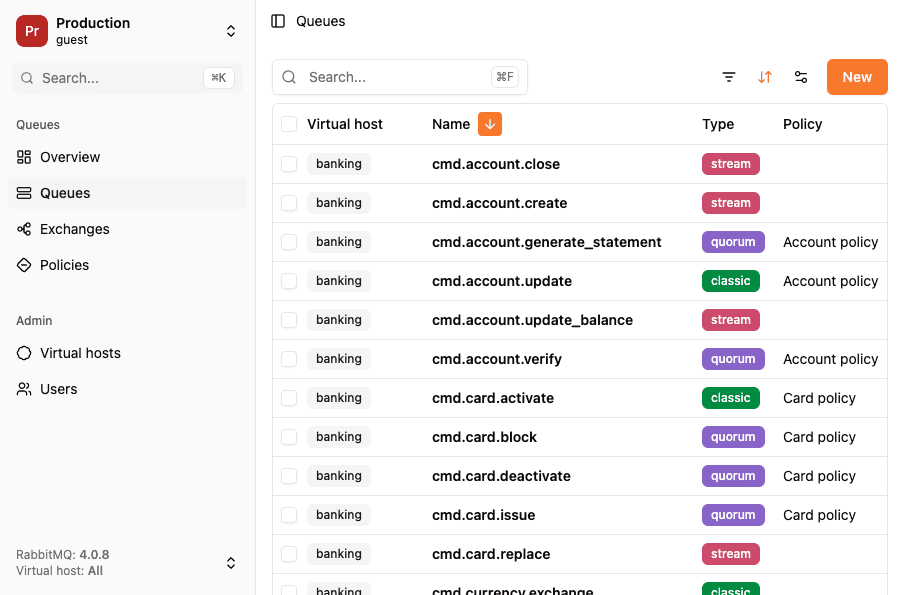
You can connect to your instance using RabbitGUI at http://localhost:15672 (guest/guest)
Docker compose setup for RabbitMQ
Create a docker-compose.yml file with custom credentials and persistent storage:
version: '3'
services:
  rabbitmq:
    image: rabbitmq:management
    container_name: rabbitmq
    ports:
      - "5672:5672"
      - "15672:15672"
    environment:
      RABBITMQ_DEFAULT_USER: user
      RABBITMQ_DEFAULT_PASS: password
    volumes:
      - rabbitmq_data:/var/lib/rabbitmq

volumes:
  rabbitmq_data:
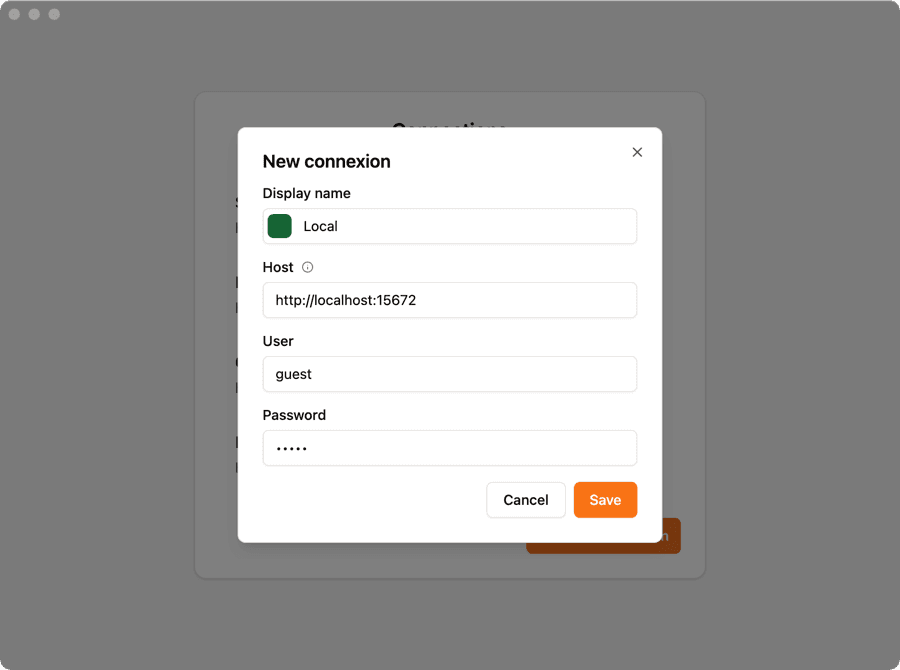
The connexion string is amqp://user:password@localhost:5672
You can connect to your instance using RabbitGUI at http://localhost:15672 (user/password)
Installation in PHP
Add the php-amqplib package to your project using Composer:
composer require php-amqplib/php-amqplibProducer example
You can publish directly to a queue using the basic_publish method:
<?php
require_once __DIR__ . '/vendor/autoload.php';

use PhpAmqpLib\Connection\AMQPStreamConnection;
use PhpAmqpLib\Message\AMQPMessage;

$connection = new AMQPStreamConnection('localhost', 5672, 'guest', 'guest');
$channel = $connection->channel();

$channel->queue_declare('my_queue', false, false, false, false);

$msg = new AMQPMessage('Hello RabbitGUI!');
$channel->basic_publish($msg, '', 'my_queue');

$channel->close();
$connection->close();
Consumer example
Your consumer can listen to messages from a queue using the basic_consume method:
<?php
require_once __DIR__ . '/vendor/autoload.php';

use PhpAmqpLib\Connection\AMQPStreamConnection;

$connection = new AMQPStreamConnection('localhost', 5672, 'guest', 'guest');
$channel = $connection->channel();

$channel->queue_declare('my_queue', false, false, false, false);

$callback = function ($msg) {
    echo "Message: " . $msg->body . "\n";
};

$channel->basic_consume('my_queue', '', false, true, false, false, $callback);

while ($channel->is_consuming()) {
    $channel->wait();
}

$channel->close();
$connection->close();
Exchanges examples
Direct
A direct exchange routes messages to queues based on exact routing key matches:
<?php
use PhpAmqpLib\Connection\AMQPStreamConnection;
use PhpAmqpLib\Message\AMQPMessage;

$connection = new AMQPStreamConnection('localhost', 5672, 'guest', 'guest');
$channel = $connection->channel();

$channel->exchange_declare('my_exchange', 'direct', false, false, false);
$channel->queue_declare('my_queue', false, false, false, false);
$channel->queue_bind('my_queue', 'my_exchange', 'my.routing.key');

$msg = new AMQPMessage('Hello RabbitGUI!');
$channel->basic_publish($msg, 'my_exchange', 'my.routing.key');

$callback = function ($msg) {
    echo "Message: " . $msg->body . "\n";
};

$channel->basic_consume('my_queue', '', false, true, false, false, $callback);
Fanout
A fanout exchange broadcasts messages to all bound queues, ignoring routing keys:
<?php
use PhpAmqpLib\Connection\AMQPStreamConnection;
use PhpAmqpLib\Message\AMQPMessage;

$connection = new AMQPStreamConnection('localhost', 5672, 'guest', 'guest');
$channel = $connection->channel();

$channel->exchange_declare('my_exchange', 'fanout', false, false, false);
$channel->queue_declare('my_queue', false, false, false, false);
$channel->queue_bind('my_queue', 'my_exchange', '');

$msg = new AMQPMessage('Hello RabbitGUI!');
$channel->basic_publish($msg, 'my_exchange', '');

$callback = function ($msg) {
    echo "Message: " . $msg->body . "\n";
};

$channel->basic_consume('my_queue', '', false, true, false, false, $callback);
Topic
A topic exchange routes messages based on wildcard pattern matching (* for one word, # for zero or more words):
<?php
use PhpAmqpLib\Connection\AMQPStreamConnection;
use PhpAmqpLib\Message\AMQPMessage;

$connection = new AMQPStreamConnection('localhost', 5672, 'guest', 'guest');
$channel = $connection->channel();

$channel->exchange_declare('my_exchange', 'topic', false, false, false);
$channel->queue_declare('my_queue', false, false, false, false);
$channel->queue_bind('my_queue', 'my_exchange', '*.routing.*');

$msg = new AMQPMessage('Hello RabbitGUI!');
$channel->basic_publish($msg, 'my_exchange', 'my.routing.key');

$callback = function ($msg) {
    echo "Message: " . $msg->body . "\n";
};

$channel->basic_consume('my_queue', '', false, true, false, false, $callback);
Message acknowledgements
Automatic acknowledgement
RabbitMQ will dequeue messages as soon as they've been sent down the wire.
$channel->basic_consume('my_queue', '', false, true, false, false, $callback);
//                                              ^^^^
//                                              auto_ack = true
Manual acknowledgement
Manually acknowledge messages after processing to ensure they are removed from the queue:
$callback = function ($msg) {
    // Process message
    $msg->ack();
};

$channel->basic_consume('my_queue', '', false, false, false, false, $callback);
//                                              ^^^^^
//                                              auto_ack = false
Reject and requeue
Reject a message and put it back in the queue for reprocessing:
$callback = function ($msg) {
    // Process message
    $msg->nack(true); // requeue = true
};

$channel->basic_consume('my_queue', '', false, false, false, false, $callback);
Reject and do not requeue
Reject a message and discard it (sends to dead letter queue if configured):
$callback = function ($msg) {
    // Process message
    $msg->nack(false); // requeue = false
};

$channel->basic_consume('my_queue', '', false, false, false, false, $callback);
Dead Letter Queues
Configure a queue with a dead letter exchange to catch rejected or expired messages:
<?php
require_once __DIR__ . '/vendor/autoload.php';

use PhpAmqpLib\Connection\AMQPStreamConnection;
use PhpAmqpLib\Wire\AMQPTable;

$connection = new AMQPStreamConnection('localhost', 5672, 'guest', 'guest');
$channel = $connection->channel();

// Create the dead letter exchange and queue
$channel->exchange_declare('dlx_exchange', 'direct', false, false, false);
$channel->queue_declare('dead_letter_queue', false, false, false, false);
$channel->queue_bind('dead_letter_queue', 'dlx_exchange', '');

// Create main queue with dead letter configuration
$args = new AMQPTable([
    'x-dead-letter-exchange' => 'dlx_exchange',
    'x-dead-letter-routing-key' => ''
]);

$channel->queue_declare('my_queue', false, false, false, false, $args);