









 RabbitGUI

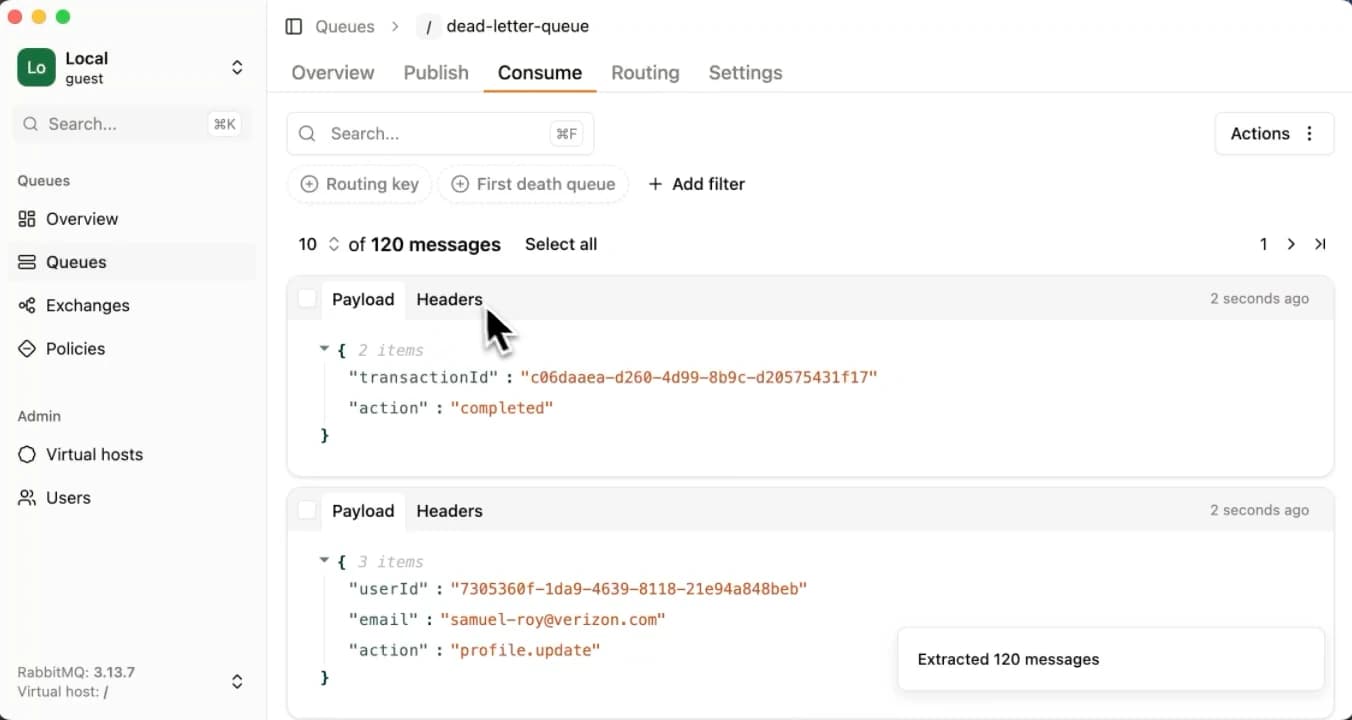
Dead-letter management
Explore and re-publish messages.
Explore messages in your queues, search, filter, and republish them anywhere you want.
How RabbitGUI helps you manage DLQs
- Search and filter messages
- Select all or only some messages
- Republish to their original queue or anywhere else
- Throttle re-publishing if needed
Multi instance support
Easily switch between environments.
Manage local, staging, and production RabbitMQ instances from a single interface. No reconfigurations or reconnecting required.
- All your environments in one place
- Easily switch between them
- Your credentials are safely stored locally
Spy on live queues
Inspect messages in real-time
RabbitGUI’s spy feature lets you peek into live queues without consuming messages. Instantly see incoming messages, their content, and metadata in real-time, so you can debug faster and understand your traffic better.
How does RabbitGUI’s spy feature work?
- Completely non-intrusive
- Search and filter live traffic
- Inspect message content and republish if needed
Drain time forecast
Precise ETA for your queues backlog
RabbitGUI estimates the backlog drain time for a queue using linear regression on historical data. This helps you make informed decisions about scaling, maintenance, and troubleshooting.
See how drain time computation works
- Precise ETA
- Countdown timer
- Visual progress
Visual routing
Navigate your routing graph.
A visual and intuitive way to understand and manage your routing. See how messages flow from your exchanges to queues, including dead-letter and alternate exchanges, and manage bindings with ease.
- Auto-layouted routing graph
- Drag and drop navigation
- Customize what’s shown with powerful filters
Policy debugger
Understand how policies apply.
Quickly see which RabbitMQ policies affect your queues and why, so you can fix mismatches or conflicts without guessing.
How policy debugging works in RabbitGUI?
- Understand why policies apply
- See which values are overridden
Quick search
Find what you need instantly.
Powerful, blazing-fast search lets you locate queues, exchanges, policies or virtual hosts in seconds, even in high-volume environments.
- Local-first instant search
- Search across everything in one place
- Keyboard shortcuts for accessibility
Pricing
Buy once, yours to keep forever
- All features includedGet the full power of RabbitGUI desktop app
- Free updates, foreverStay on top of the latest features
- 30-day money-back guaranteeDon't like it? Get a full refund, no questions asked
- Yours to keep foreverNo subscriptions, no strings attached
Checkout our latest articles about RabbitMQ
 RabbitMQ tutorialRabbitMQ exponential backoff: how to retry messages with increasing delaysHow to implement exponential backoff retries in RabbitMQ with TTL retry queues and dead-letter exchanges. Track attempts with an x-retry-count header, choose retry delays, and send final failures to a DLQ.
 ProductHow to browse RabbitMQ messages without consuming themRabbitMQ has no read-only API to browse a queue. Learn what the management UI's "Get messages" actually does, the side effects of requeueing, and how to inspect messages safely with RabbitGUI.
 RabbitMQ tutorialWhat is AMQP? The Advanced Message Queuing Protocol explainedLearn what AMQP (Advanced Message Queuing Protocol) is, how it works, its core concepts, why it powers RabbitMQ, and how it compares to alternatives like MQTT, STOMP, and Kafka.