What is AMQP? The Advanced Message Queuing Protocol explained
June 1, 2026•9 min read•RabbitMQ tutorial

What is AMQP?
AMQP, short for Advanced Message Queuing Protocol, is an open, binary, application-layer protocol for passing messages between applications and services. It defines exactly how producers, brokers, and consumers talk to each other over the network, what a message looks like on the wire, and what guarantees the broker provides around delivery, ordering, and acknowledgment.
In other words: AMQP is the standardized "language" that message brokers and clients use to exchange data reliably across systems, languages, and platforms.
It's the protocol that powers RabbitMQ, Apache Qpid, ActiveMQ (via plugins), and several cloud-hosted message brokers.
Why AMQP was created
Before AMQP, every message-broker vendor had its own proprietary protocol. If you wrote code against IBM MQ, TIBCO, or MSMQ, you were locked into that vendor's client libraries, tooling, and pricing.
AMQP was designed in 2003 by John O'Hara at JPMorgan Chase to solve this exact problem. The goal was simple:
- A single, open standard that any broker or client could implement
- Vendor neutrality, so brokers from different companies could interoperate
- Cross-language support, so a Java publisher could send messages to a Python consumer through any compliant broker
- Strong guarantees around reliability and security, suitable for financial systems
The protocol was later standardized by OASIS, and AMQP 1.0 became an ISO/IEC standard (19464) in 2014.
The two flavors of AMQP
This is the part that confuses most newcomers: there are two distinct versions of AMQP, and they are not compatible with each other.
AMQP 0-9-1
AMQP 0-9-1 is the version implemented by RabbitMQ and by far the most widely deployed in the wild. It defines a rich, opinionated model with exchanges, queues, bindings, and routing keys built directly into the protocol.
If you've ever written code like this:
await channel.assertExchange("orders", "direct");
await channel.assertQueue("order.created");
await channel.bindQueue("order.created", "orders", "order.created");
channel.publish("orders", "order.created", Buffer.from("new order"));
…you were speaking AMQP 0-9-1.
AMQP 1.0
AMQP 1.0 is a complete redesign. It's a much thinner, more generic protocol that only defines how to move messages between two endpoints. Concepts like exchanges and queues are not part of AMQP 1.0; brokers expose those as implementation details.
AMQP 1.0 is used by Azure Service Bus, Apache Qpid, and Solace, among others. RabbitMQ supports AMQP 1.0 via a plugin, but its native protocol remains 0-9-1.
For the rest of this article, "AMQP" refers to AMQP 0-9-1 unless stated otherwise, since that's what RabbitMQ users encounter day-to-day.
How AMQP works
AMQP follows the classic Producer → Broker → Consumer pattern, but with a twist: producers never send messages directly to queues. They send them to an exchange, and the broker routes them to one or more queues based on rules.
The full flow looks like this:
Producer → Exchange → Binding (routing key) → Queue → Consumer
This indirection is what gives AMQP its flexibility. Producers don't need to know which consumers exist or how many queues are interested in a message, they just publish to an exchange and let the broker figure out the rest.
Core AMQP concepts
A handful of building blocks make up the AMQP model. Understanding them is the key to using RabbitMQ effectively.
Connections and channels
A connection is a long-lived TCP connection between a client and the broker. Opening and closing TCP connections is expensive, so AMQP encourages you to open one connection per application and reuse it.
Inside a connection, you create channels, which are lightweight virtual connections multiplexed over the single TCP socket. Channels are where the actual work happens: publishing, consuming, declaring queues, and so on. A typical app opens one channel per thread or per consumer.
Exchanges
An exchange is the routing layer. Producers always publish to an exchange, never directly to a queue. AMQP defines four exchange types, each with its own routing logic:
- Direct: routes by exact routing-key match
- Fanout: broadcasts to every bound queue
- Topic: routes by wildcard pattern (
order.#,*.created.*) - Headers: routes by message header attributes
See RabbitMQ exchange types explained for animated examples of each one in action.
Queues
A queue is an ordered buffer that holds messages until a consumer is ready to process them. Queues can be:
- Durable: survive a broker restart
- Exclusive: used by only one connection
- Auto-delete: removed when the last consumer disconnects
Bindings and routing keys
A binding is a rule that links an exchange to a queue. Most bindings include a routing key, which the exchange uses (depending on its type) to decide whether a given message should be delivered to that queue.
Messages
An AMQP message has two parts:
- A body, opaque bytes; AMQP doesn't care about the format (JSON, Protobuf, plain text, anything)
- A set of properties and headers, metadata like
content-type,delivery-mode(persistent vs transient),priority,expiration,correlation-id, custom headers, and more
Acknowledgments
When a consumer receives a message, it can either auto-ack (the broker assumes delivery the moment the message is sent) or manually ack after processing. Manual acks are what make AMQP reliable: if a consumer crashes mid-processing, the broker re-queues the message for another consumer.
For a deeper dive, see RabbitMQ message acknowledgment explained.
A minimal AMQP example
Here's the smallest possible round-trip using the Node.js amqplib client:
import amqp from "amqplib";

const connection = await amqp.connect("amqp://guest:guest@localhost:5672");
const channel = await connection.createChannel();

await channel.assertQueue("hello");

channel.sendToQueue("hello", Buffer.from("Hello AMQP!"));

await channel.consume("hello", (msg) => {
  if (msg) {
    console.log("Received:", msg.content.toString());
    channel.ack(msg);
  }
});
Behind the scenes this opens a TCP connection on the default AMQP port 5672, negotiates the protocol version, opens a channel, declares a queue, publishes a message through the default exchange, and starts a consumer.
AMQP message lifecycle
To make the guarantees concrete, here's what happens to a single message from publish to processing:
- The producer opens a channel and calls
publishon an exchange with a routing key. - The broker evaluates all bindings on that exchange and copies the message into every matching queue.
- The message sits in the queue (in memory and, if marked persistent, on disk).
- When a consumer is ready, the broker dispatches the message over the consumer's channel.
- The consumer processes the message and sends an ack.
- The broker removes the message from the queue.
If anything goes wrong, the consumer disconnects, the broker restarts, the network fails, AMQP's combination of durable queues, persistent messages, and manual acks ensures the message is either redelivered or dead-lettered rather than silently lost.
AMQP ports and security
AMQP runs over TCP on a few well-known ports:
- 5672: plain AMQP
- 5671: AMQP over TLS/SSL (AMQPS)
For production traffic, always use AMQPS. AMQP also supports SASL for authentication, so you can layer username/password, EXTERNAL (client certificate), or other mechanisms on top of the encrypted channel.
For the full list of ports RabbitMQ uses, see RabbitMQ ports explained.
AMQP vs other messaging protocols
AMQP is one of several protocols you'll encounter in the messaging world. Here's how it compares.
AMQP vs MQTT
MQTT is a lightweight publish/subscribe protocol designed for constrained devices and unreliable networks, think IoT sensors over cellular links. It has a tiny wire footprint and three simple QoS levels, but it lacks AMQP's richer routing model.
Use MQTT when you have thousands of small devices publishing telemetry. Use AMQP when you need flexible server-to-server routing with strong delivery guarantees.
RabbitMQ supports both protocols simultaneously, so you can bridge them.
AMQP vs STOMP
STOMP (Streaming Text Oriented Messaging Protocol) is a simple, text-based protocol that's trivial to implement in any language, you can literally telnet into a broker and type STOMP frames by hand. It trades AMQP's features and binary efficiency for simplicity.
STOMP is great for browser clients (over WebSockets) and quick prototyping. AMQP is the better choice for production server-to-server messaging.
AMQP vs Kafka
Kafka is not really a comparable protocol, it's a distributed commit log with its own custom binary protocol. Kafka excels at high-throughput event streaming and long-term retention, where AMQP excels at flexible routing, per-message acks, and request/reply patterns.
For a full breakdown, see RabbitMQ vs Kafka.
AMQP vs HTTP / REST
HTTP is synchronous and point-to-point. AMQP is asynchronous and many-to-many. If a service can be temporarily down, or if you want to fan out one event to many consumers, AMQP is the better fit. If you need an immediate, synchronous response, HTTP usually wins.
When to use AMQP
AMQP shines in scenarios where you need:
- Asynchronous task processing: offloading work to background workers (emails, image resizing, report generation)
- Microservice communication: decoupling services so they can evolve and scale independently
- Reliable event distribution: fanning out events to multiple consumers with delivery guarantees
- Request/reply over messaging: using
reply-toandcorrelation-idfor RPC-style calls - Workflow orchestration: chaining services together through queues, with dead-lettering for failures
If you're building an event bus or designing a system where reliability matters more than raw throughput, AMQP is almost always the right call.
Inspecting AMQP traffic in practice
One of the trickier parts of working with AMQP is that messages are invisible by default. They flow through exchanges and queues without leaving a trace, which makes debugging routing issues frustrating.
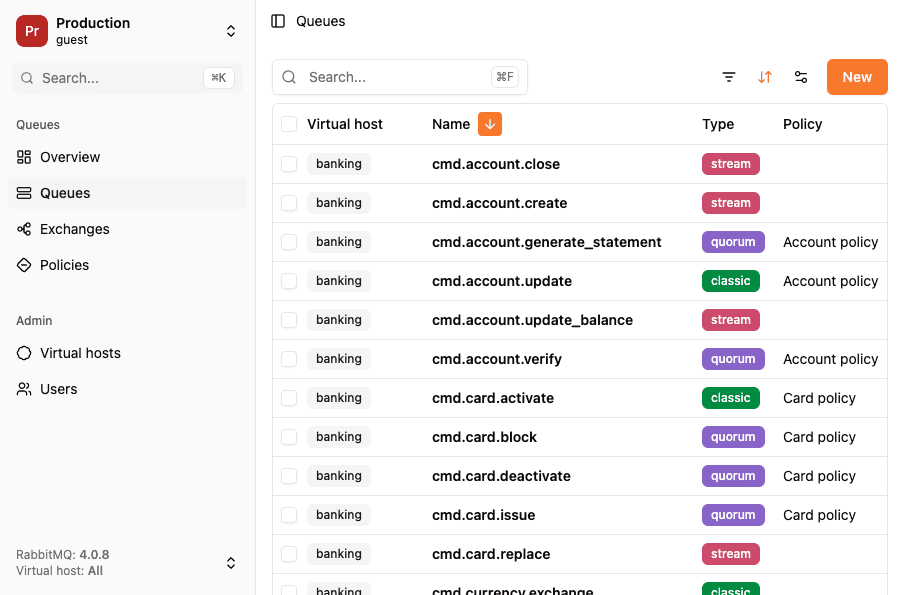
RabbitGUI gives you a live view of every exchange, queue, and binding in your broker, lets you publish test messages, and even lets you spy on real-time queue traffic without disturbing your production consumers. It's the easiest way to actually see your AMQP topology in motion.
Key takeaways
- AMQP is an open, binary, application-layer protocol for reliable messaging between applications.
- There are two incompatible versions: AMQP 0-9-1 (used by RabbitMQ) and AMQP 1.0 (used by Azure Service Bus and others).
- The model is Producer → Exchange → Binding → Queue → Consumer, which decouples senders from receivers.
- Core concepts: connections, channels, exchanges, queues, bindings, routing keys, messages, and acknowledgments.
- AMQP guarantees delivery through durable queues, persistent messages, and manual acks.
- It runs on TCP port 5672 (plain) or 5671 (TLS) and supports authentication via SASL.
- Choose AMQP for reliable server-to-server messaging, choose MQTT for IoT, STOMP for simplicity, and Kafka for high-throughput event streaming.
Final thoughts
AMQP solved a real problem: every message broker used to speak its own dialect, and switching vendors meant rewriting your application. By standardizing the wire format and the messaging model, AMQP turned message brokers into a commodity and made systems like RabbitMQ possible.
If you're just getting started, the best next step is to spin up a broker and send your first message. Our setup RabbitMQ with Docker and Docker Compose guide gets you running in a couple of minutes, and from there you can explore exchanges, queues, and the rest of the AMQP model hands-on.