
How to retry failed messages in RabbitMQ
Don't use unlimited nack(msg, false, true) as your retry strategy. It redelivers the failed message immediately, with no delay and no limit, so a message that always fails loops forever. For production retries you need three things:
- A maximum number of attempts, tracked with a retry counter.
- A delay between attempts, fixed or increasing (backoff), so a failing dependency has time to recover.
- A final failure path, usually a dead-letter queue (DLQ), where messages go once retries are exhausted.
RabbitMQ has no built-in "retry" feature, but it gives you the building blocks: dead-letter exchanges, message TTL and, optionally, the delayed message exchange plugin. There are three common ways to combine them:
- TTL + retry queue: failed messages wait in a retry queue with a TTL, then are dead-lettered back to the work queue. Fixed delay.
- Multiple TTL retry queues: one retry queue per delay (5s, 15s, 60s...). Exponential backoff without plugins, see RabbitMQ exponential backoff for a full walkthrough.
- Delayed message exchange: the delay is set per message with an
x-delayheader. Flexible delays, requires a plugin.
RabbitMQ retry patterns compared
| Pattern | Delay | Retry count | Best for |
|---|---|---|---|
Requeue (nack with requeue=true) | None | Difficult to control | Rare, short-lived transient failures |
| TTL + retry queue | Fixed | Controlled | Standard retries |
| Multiple TTL retry queues | Increasing | Controlled | Exponential backoff |
| Delayed message exchange | Flexible, per message | Controlled | Flexible delayed delivery |
In every pattern except plain requeue, messages that exceed the maximum number of attempts are moved to a dead-letter queue, where you can inspect them and decide what to do.
RabbitMQ requeue vs retry
"Requeue" and "retry" are often used interchangeably, but in RabbitMQ they are very different things.
What requeue does
When message processing fails, the most tempting approach is to requeue the message with nack:
channel.consume("orders", (msg) => {
  try {
    processOrder(msg);
    channel.ack(msg);
  } catch (err) {
    channel.nack(msg, false, true);
  }
});
The third argument of nack (requeue=true) tells RabbitMQ to put the message back in the queue, as close as possible to its original position. It is then redelivered almost instantly, usually to the same consumer, with the redelivered flag set. reject(msg, true) behaves the same way for a single message. See RabbitMQ message acknowledgment explained for the difference between ack, nack and reject.
Why requeue creates infinite loops
If the failure is persistent (bad payload, downstream service down, bug in processing logic), the message fails again immediately, creating a tight infinite loop that:
- Burns CPU on both the consumer and the broker
- Blocks other messages in the queue
- Floods your logs with errors
- Never resolves on its own
The redelivered flag doesn't help: it only tells you the message was delivered at least once before, not how many times. On classic queues there is no way to know if a message is on its 2nd or its 20,000th attempt.
Why retry queues are better
A retry pattern moves the failed message out of the work queue into a separate place where it waits before being tried again. This gives you:
- Delay: the message isn't redelivered until the delay expires, so a failing dependency has time to recover.
- Control: you count attempts and stop after a maximum.
- A final destination: messages that keep failing end up in a DLQ instead of looping.
- Unblocked queues: other messages keep flowing while the failed one waits.
Requeue is only reasonable for failures you know are momentary, such as a consumer shutting down mid-processing, and even then it should be combined with a limit (see quorum queue delivery limits below).
Pattern 1: retry with dead-letter queues and TTL
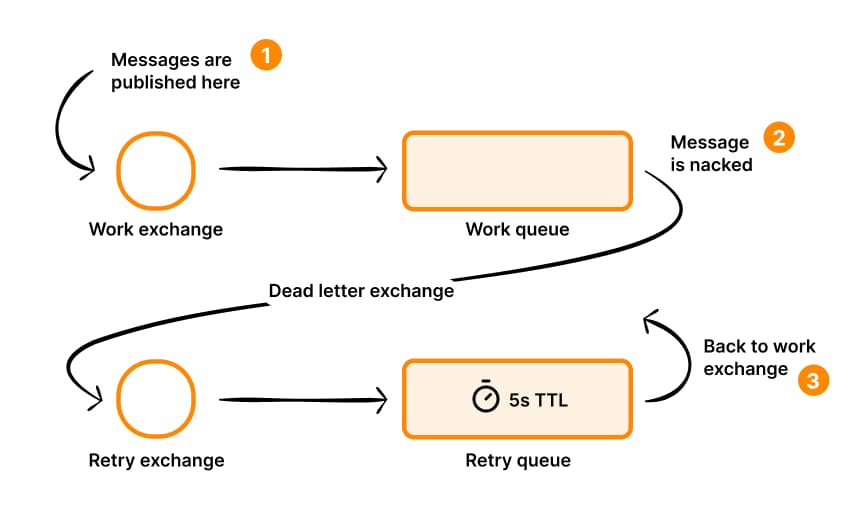
The most common retry pattern in RabbitMQ uses a pair of queues: a work queue and a retry queue. Failed messages are sent to the retry queue, which has a TTL. When the TTL expires, the message is dead-lettered back to the work queue for another attempt. Once the maximum number of attempts is reached, the message goes to a final dead-letter queue instead.
Setting up the topology
import amqp from "amqplib";

const connection = await amqp.connect("amqp://localhost:5672");
const channel = await connection.createChannel();

// Work exchange and queue
await channel.assertExchange("work_exchange", "direct");
await channel.assertQueue("work_queue", {
  durable: true,
  deadLetterExchange: "retry_exchange",
  deadLetterRoutingKey: "retry",
});
await channel.bindQueue("work_queue", "work_exchange", "work");

// Retry exchange and queue (messages wait here before being retried)
await channel.assertExchange("retry_exchange", "direct");
await channel.assertQueue("retry_queue", {
  durable: true,
  deadLetterExchange: "work_exchange",
  deadLetterRoutingKey: "work",
  messageTtl: 5000,
});
await channel.bindQueue("retry_queue", "retry_exchange", "retry");

// Dead-letter queue for messages that exceeded max retries
await channel.assertExchange("dlx_exchange", "direct");
await channel.assertQueue("dead_letter_queue", { durable: true });
await channel.bindQueue("dead_letter_queue", "dlx_exchange", "dead");
The retry queue has no consumer. Messages simply sit there until their TTL expires, and RabbitMQ dead-letters them back to work_exchange. The TTL is set on the queue (messageTtl), not per message: RabbitMQ only expires messages at the head of a queue, so mixing per-message TTLs in one queue can leave short-delay messages stuck behind long-delay ones. If you are new to exchange routing, see RabbitMQ exchange types explained.
Consumer with retry counting
const MAX_RETRIES = 3;

await channel.prefetch(10);

channel.consume("work_queue", (msg) => {
  const headers = msg.properties.headers || {};
  const retryCount = headers["x-retry-count"] || 0;

  try {
    processOrder(msg);
    channel.ack(msg);
  } catch (err) {
    channel.ack(msg);

    if (retryCount >= MAX_RETRIES) {
      // Send to dead-letter queue
      channel.publish("dlx_exchange", "dead", msg.content, {
        headers: { ...headers, "x-retry-count": retryCount, "x-error": err.message },
      });
    } else {
      // Send to retry queue with incremented count
      channel.publish("retry_exchange", "retry", msg.content, {
        headers: { ...headers, "x-retry-count": retryCount + 1 },
      });
    }
  }
});
Notice that we ack the original message and then republish it to either the retry queue or the dead-letter queue. This gives us full control over the headers and routing, rather than relying on nack which doesn't let us modify the message.
In production, use a confirm channel and only ack the original message once the broker has confirmed the republish. Otherwise a crash between the ack and the publish loses the message.
Retry counting and maximum attempts
Retry counting is what turns an infinite loop into a controlled retry. Classic queues don't track how many times a message has been processed, so you have to track it yourself.
Tracking the retry counter
The consumer above stores the counter in a custom x-retry-count header. Each time a message fails, it is republished with x-retry-count + 1. Because the counter travels with the message, it survives restarts, works across multiple consumers, and is visible to anyone inspecting the queue.
Other options exist, each with limitations:
| Source | How it works | Limitation |
|---|---|---|
Custom x-retry-count header | Incremented by your consumer on republish | You must republish instead of nack |
x-death header | RabbitMQ adds and counts an entry each time the message is dead-lettered | Only works if retries go through dead-lettering, format is verbose |
x-delivery-count header | Quorum queues count redeliveries, and delivery-limit dead-letters the message after N attempts | Quorum queues only, no delay between attempts |
redelivered flag | Set on any redelivery | Boolean, not a count |
A custom header is the most explicit and portable choice, and it's what the rest of this article uses.
What happens after the maximum attempts
Once x-retry-count reaches MAX_RETRIES, the message should stop being retried. Retrying forever only delays the problem and fills your retry queues. Instead, the consumer:
- Acks the original message, so it leaves the work queue.
- Publishes it to the final DLQ, through
dlx_exchange, instead of the retry exchange. - Preserves error information in headers, so whoever looks at the DLQ knows why it failed.
Useful headers to add when moving a message to the DLQ:
channel.publish("dlx_exchange", "dead", msg.content, {
  headers: {
    ...headers,
    "x-retry-count": retryCount,
    "x-error": err.message,
    "x-error-stack": err.stack?.slice(0, 2000),
    "x-failed-at": new Date().toISOString(),
    "x-original-queue": "work_queue",
    "x-original-routing-key": msg.fields.routingKey,
  },
});
Keeping the original headers (...headers) matters too: correlation IDs, tenant IDs and trace IDs are what let you connect a dead message to the request that produced it.
Don't retry what can't succeed
Some errors will never succeed on retry: invalid JSON, a failed schema validation, a missing required field. Retrying those only wastes three delay cycles. Send them straight to the DLQ:
const isPermanent = err instanceof ValidationError;

if (isPermanent || retryCount >= MAX_RETRIES) {
  // publish to dlx_exchange
}
Reserve retries for transient failures: timeouts, a database or API that is temporarily unavailable, rate limiting, lock contention.
Pattern 2: RabbitMQ exponential backoff with multiple retry queues
A fixed 5-second delay isn't always ideal. If a downstream service is down, you want to wait progressively longer between retries to give it time to recover. This is exponential backoff. This section summarizes the pattern; for delay selection, failure classification and a production-ready consumer, read the dedicated guide to RabbitMQ exponential backoff.
Exponential backoff example: 5s, 15s, 60s, then DLQ
A typical backoff schedule with three retries:
| Attempt | Result | Next step |
|---|---|---|
| 1 (initial delivery) | Fails | Wait 5 seconds in retry_5000ms |
| 2 | Fails | Wait 15 seconds in retry_15000ms |
| 3 | Fails | Wait 60 seconds in retry_60000ms |
| 4 | Fails | Move to dead-letter queue |
The message gets four processing attempts over about 80 seconds before being declared failed. The architecture looks like this:
Every retry queue dead-letters back to work_exchange. The consumer picks the retry queue from the current x-retry-count, and publishes to the DLQ once the counter reaches the maximum.
Multiple delay queues
Create separate retry queues for each delay tier:
const delays = [5000, 15000, 60000]; // 5s, 15s, 60s

for (const delay of delays) {
  await channel.assertQueue(`retry_${delay}ms`, {
    durable: true,
    deadLetterExchange: "work_exchange",
    deadLetterRoutingKey: "work",
    messageTtl: delay,
  });
  await channel.bindQueue(`retry_${delay}ms`, "retry_exchange", `retry_${delay}`);
}
One queue per delay is required because TTL expiry only happens at the head of the queue. With a single queue and per-message TTLs, a 60-second message at the head would block a 5-second message behind it.
Consumer with backoff logic
const DELAYS = [5000, 15000, 60000];
const MAX_RETRIES = DELAYS.length;

channel.consume("work_queue", (msg) => {
  const headers = msg.properties.headers || {};
  const retryCount = headers["x-retry-count"] || 0;

  try {
    processOrder(msg);
    channel.ack(msg);
  } catch (err) {
    channel.ack(msg);

    if (retryCount >= MAX_RETRIES) {
      channel.publish("dlx_exchange", "dead", msg.content, {
        headers: { ...headers, "x-retry-count": retryCount, "x-error": err.message },
      });
    } else {
      const delay = DELAYS[retryCount];
      channel.publish("retry_exchange", `retry_${delay}`, msg.content, {
        headers: { ...headers, "x-retry-count": retryCount + 1 },
      });
    }
  }
});
The first failure retries after 5 seconds, the second after 15 seconds, the third after 60 seconds. After that, the message goes to the dead-letter queue.
If many messages fail at the same time (for example when a dependency goes down), they all come back at the same time too. When that is a problem, add a few tiers or spread load across more consumers rather than relying on a single very long delay.
Pattern 3: retry with the delayed message exchange plugin
If you have the delayed message exchange plugin installed, you can implement exponential backoff with a single exchange instead of multiple queues:
await channel.assertExchange("retry_delayed", "x-delayed-message", {
  arguments: { "x-delayed-type": "direct" },
});

await channel.bindQueue("work_queue", "retry_delayed", "work");
Then in your consumer, set the delay dynamically per message:
const DELAYS = [5000, 15000, 60000];

channel.consume("work_queue", (msg) => {
  const headers = msg.properties.headers || {};
  const retryCount = headers["x-retry-count"] || 0;

  try {
    processOrder(msg);
    channel.ack(msg);
  } catch (err) {
    channel.ack(msg);

    if (retryCount >= DELAYS.length) {
      channel.publish("dlx_exchange", "dead", msg.content, {
        headers: { ...headers, "x-retry-count": retryCount, "x-error": err.message },
      });
    } else {
      channel.publish("retry_delayed", "work", msg.content, {
        headers: {
          ...headers,
          "x-retry-count": retryCount + 1,
          "x-delay": DELAYS[retryCount],
        },
      });
    }
  }
});
This is the cleanest approach but requires plugin installation, and delayed messages are stored on a single node rather than in a replicated queue. See our delayed messages guide for setup instructions and trade-offs.
Retry queue vs dead-letter queue
Retry queues and dead-letter queues use the same RabbitMQ mechanism (dead-letter exchanges), which is why they are easy to confuse. They have opposite roles:
- Retry queue: a temporary waiting area before another attempt. Messages are expected to leave it automatically, after their TTL, and go back to the work queue. It has no consumer and should be close to empty most of the time.
- Dead-letter queue (DLQ): the final destination for messages that should no longer be processed normally. Nothing consumes it automatically. Messages stay there until a human or a dedicated tool inspects them, fixes the cause, and replays or discards them.
| Retry queue | Dead-letter queue | |
|---|---|---|
| Purpose | Wait before retrying | Park messages that failed for good |
| Messages leave | Automatically, on TTL expiry | Manually, after investigation |
| Consumer | None | None, or an alerting / replay tool |
| Expected size | Small, fluctuating | Should be zero, any growth needs attention |
| Healthy sign | Messages flowing through | Empty |
A growing retry queue means a dependency is struggling. A growing DLQ means messages are being lost to normal processing. Both are worth monitoring and alerting on.
To configure dead-lettering on the broker side, with policies and queue arguments, see setting up dead-letter queues properly in RabbitMQ.
Which retry pattern should I use?
| If you need... | Use |
|---|---|
| Simple fixed-delay retries | TTL + retry queue |
| Increasing delays (exponential backoff) | Multiple TTL retry queues |
| Flexible, per-message delays | Delayed message exchange |
| To stop processing a message that keeps failing | Dead-letter queue |
| To retry a message that fails for a split second, occasionally | Requeue, with a quorum queue delivery-limit |
And the trade-offs of each retry approach:
| Approach | Pros | Cons |
|---|---|---|
| Single retry queue (fixed delay) | Simple setup, no plugins | Fixed delay only, no backoff |
| Multiple retry queues (backoff) | Exponential backoff, no plugins | More queues to manage |
| Delayed exchange plugin | Cleanest code, flexible delays | Requires plugin, not cluster-safe |
For most production systems, multiple retry queues with exponential backoff is the sweet spot. It works on any RabbitMQ installation, supports backoff, and scales with standard queue features like quorum replication. Whatever you choose, always end the chain with a DLQ.
Inspecting failed messages in retry queues and DLQs
Once retries are in place, the next question is always: what is actually sitting in my retry and dead-letter queues, and why? RabbitMQ doesn't make that easy. Queues can only be read from the front, and the Management UI's "Get messages" shows raw payloads one at a time, with no way to filter or search (see how to browse RabbitMQ messages without consuming them).
RabbitGUI is built for this workflow. Open the DLQ, or one of your retry queues, go to the "Consume" tab, and extract messages, either peeking (messages are requeued) or consuming them into a local database on your machine.
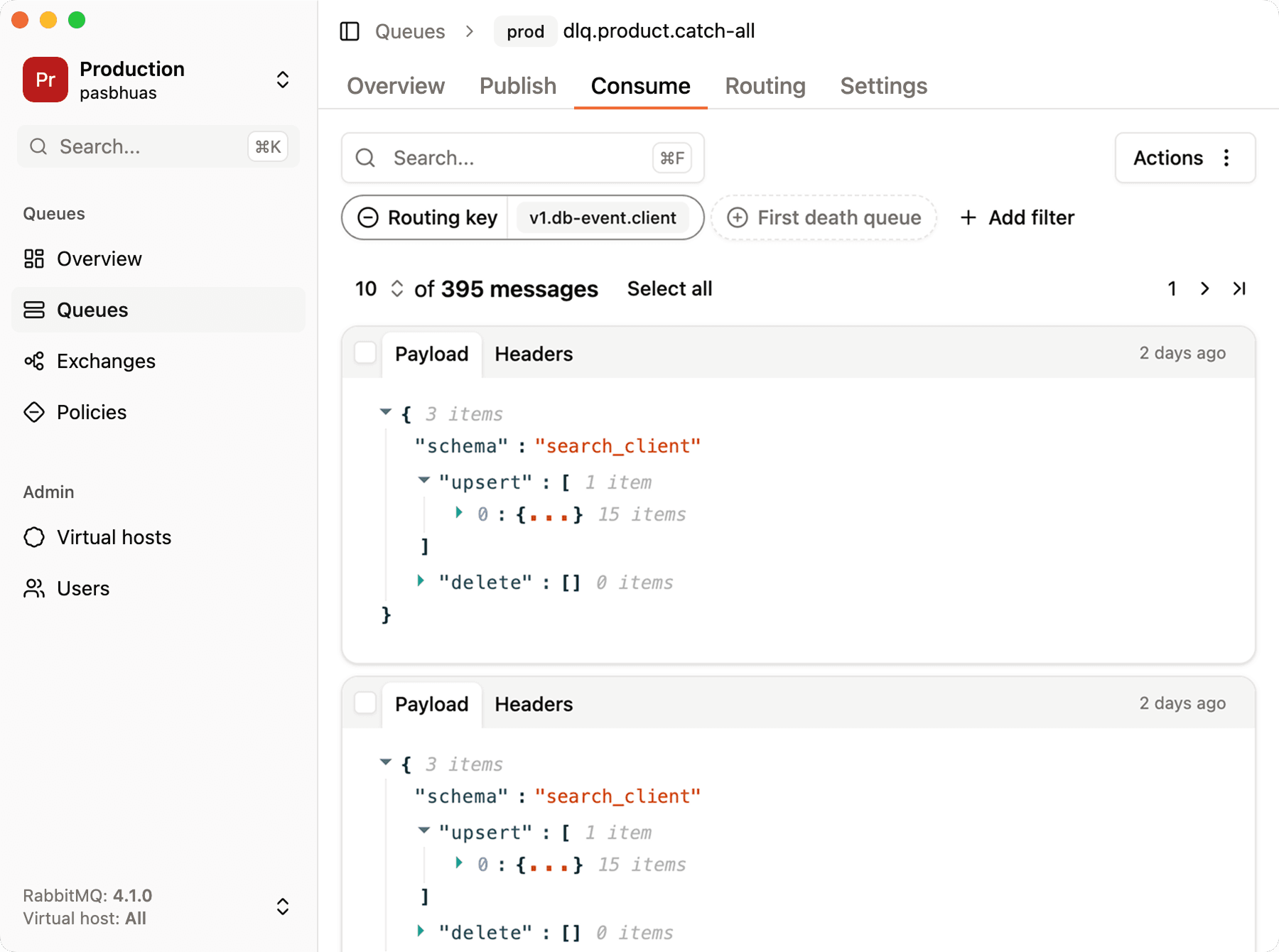
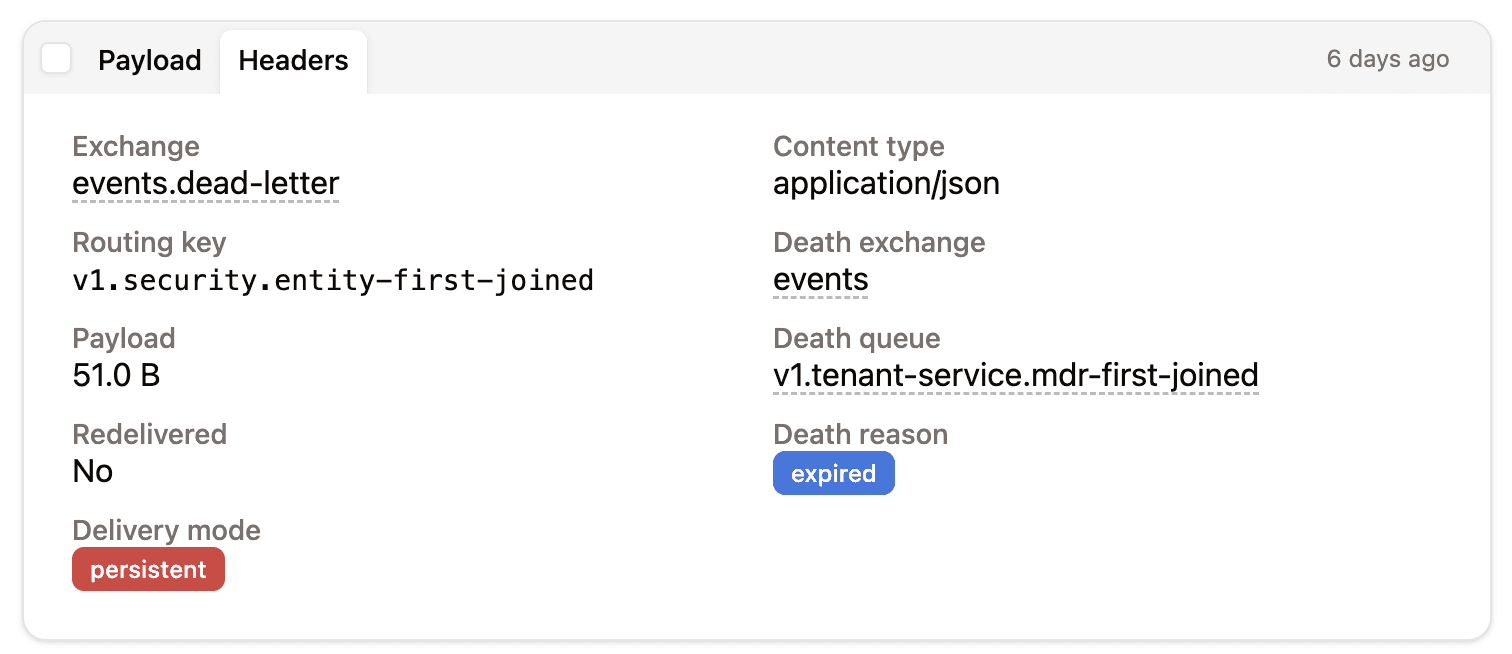
Check the retry count and error headers
Open any message and go to the "Headers" tab to see the x-retry-count, x-error and other headers your consumer added, alongside RabbitMQ's own x-death entries. This is the fastest way to confirm your retry logic behaves as expected: a message in the DLQ should show the maximum retry count and the last error.
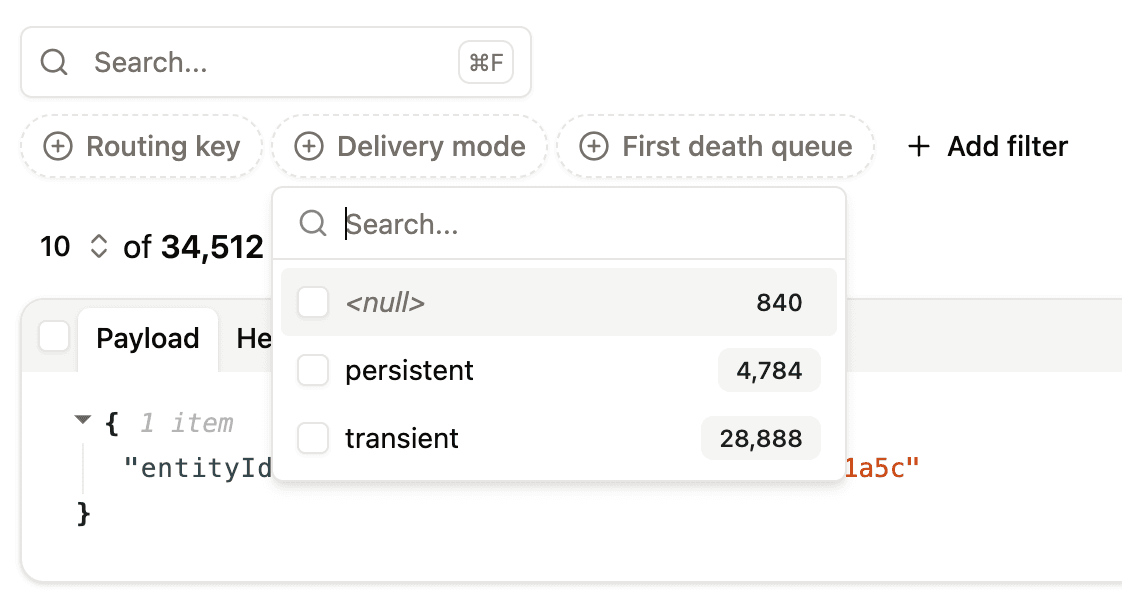
Filter failed messages
With hundreds of dead messages, you need to know whether they all failed for the same reason. Filter on any property or header, such as the routing key, x-error or x-retry-count, to group failures and find the ones that matter.
Replay messages after fixing the cause
Once the bug is fixed or the dependency is back, select the messages and re-publish them to the work exchange. You can change the exchange or routing key, and throttle the rate so a large DLQ doesn't overwhelm your consumers. Remember to reset x-retry-count if you want replayed messages to get a full set of retries.
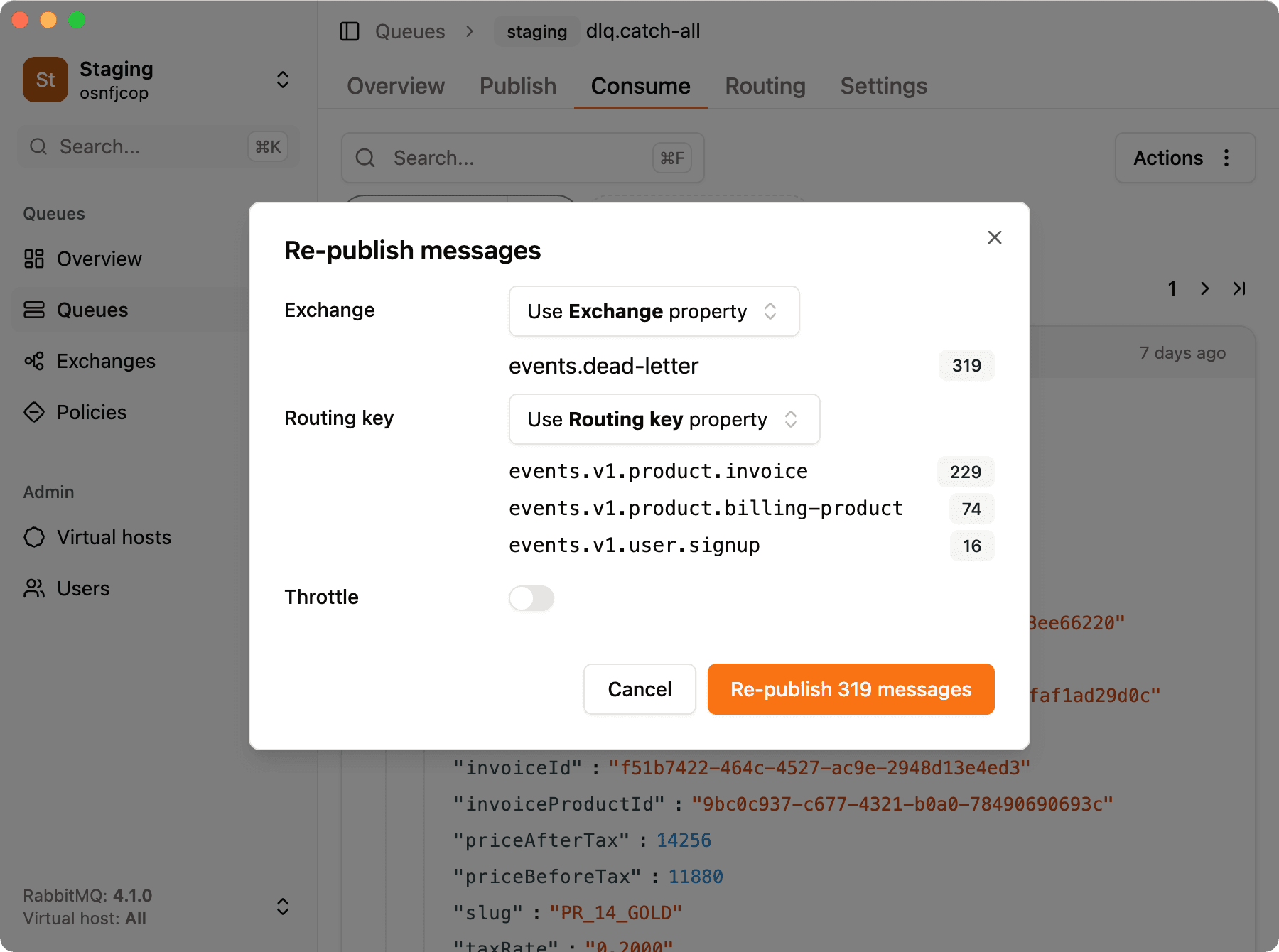
The full walkthrough is in how to introspect dead-letter queues in RabbitMQ.
FAQ
Does RabbitMQ have a built-in retry mechanism?
No. RabbitMQ provides the building blocks (dead-letter exchanges, message TTL, quorum queue delivery limits, and the delayed message exchange plugin), but the retry logic, counting and delays, is something you assemble yourself.
How do I retry a RabbitMQ message with a delay?
Publish the failed message to a retry queue that has a x-message-ttl and a dead-letter exchange pointing back to the work queue. When the TTL expires, RabbitMQ moves the message back for another attempt. Alternatively, use the delayed message exchange plugin with an x-delay header.
How do I limit the number of retries in RabbitMQ?
Store a retry counter in a message header (for example x-retry-count), increment it each time you republish to the retry queue, and send the message to a dead-letter queue once it reaches your maximum. On quorum queues, the delivery-limit argument does this for requeued messages.
What is the difference between requeue and retry in RabbitMQ?
Requeue (nack or reject with requeue=true) puts the message back immediately with no delay and no counter. Retry moves the message to a separate queue where it waits before being processed again, with a maximum number of attempts.
How do I implement exponential backoff in RabbitMQ?
Create one retry queue per delay tier, for example 5s, 15s and 60s, each with its own TTL and dead-lettering back to the work queue. Your consumer picks the tier based on the current retry count, and sends the message to the DLQ once all tiers are used. See RabbitMQ exponential backoff for a complete example.