RabbitMQ HTTP monitoring API
RabbitMQ provides an HTTP-based API for monitoring and managing the server. This API is part of the RabbitMQ Management Plugin, which is included with RabbitMQ but might need to be enabled.
If you are using Docker for instance, use the rabbitmq:management image. If you are using a hosted RabbitMQ service like CloudAMQP, the management plugin is usually enabled by default.
The default port for the management API is 15672 and it uses basic HTTP authentication. See RabbitMQ ports explained for the other ports RabbitMQ listens on.
curl -u {username}:{password} {hostname}:15672/api/versionYou can use the built-in UI to explore the API at http://{hostname}:15672 or use a dedicated tool like RabbitGUI to interact with the API.
Individual queue metrics
You can query a specific queue using the GET /api/queues/{vhost}/{queue_name} endpoint. Make sure to URL-encode the virtual host and queue name if they contain special characters, most commonly the virtual host is / which should be encoded as %2F.
curl -u {username}:{password} {hostname}:15672/api/queues/%2F/my-queueQuery params
This endpoint has 4 query parameters:
lengths_ageandlengths_incrmsg_rates_ageandmsg_rates_incr
These parameters control the time series that are returned. You can adjust this window using the *_age parameters (in seconds) which controls how far in the past you want the data and the *_incr parameters (also in seconds) to specify the increment between two data points. The possible values are limited by your specific configuration, but usually the only valid values are:
*_age=600and*_incr=5for a 10-minute window with 5-second increments*_age=3600and*_incr=60for a 1-hour window with 1-minute increments
curl -u {username}:{password} "{hostname}:15672/api/queues/%2F/my-queue?lengths_age=600&lengths_incr=5&msg_rates_age=600&msg_rates_incr=5"Response body
Messages metrics
The response body is a JSON object containering various metrics about the queue. Here are some of the most important ones:
messages: total number of messages in the queuemessages_ready: number of messages ready to be delivered to consumersmessages_unacknowledged: number of messages delivered to consumers but not yet acknowledged (see message acknowledgments for what this implies)reductions: number of times the queue has been reduced in size due to message expirations or TTLs
You can get the current value of a metric by simply accessing the corresponding field in the JSON object. For example, to get the total number of messages in the queue body.messages.
If you use a retry pattern, messages on your retry and dead-letter queues are two of the most useful metrics to alert on: a growing retry queue means a dependency is struggling, and any growth in the dead-letter queue means messages have exhausted their retries.
For each metric, the response also includes a *_details field that contains the time series data. For example, body.messages_details is an object with those properties:
avg: the average value of the metric over the specified time windowavg_rate: the average rate of change (in seconds) of the metric over the specified time windowrate: the current rate of change (in seconds) of the metricsamples: an array of data points, each containing atimestampin milliseconds andsample, the value of the metric at that time
For instance, to get the number of messages over time, you can access body.messages_details.samples which will return an array like this:
[
  {
    "sample": 3,
    "timestamp": 1769254805000
  },
  {
    "sample": 1,
    "timestamp": 1769254800000
  },
  //...
]
This is the information used by RabbitGUI to display the queue metrics over time:
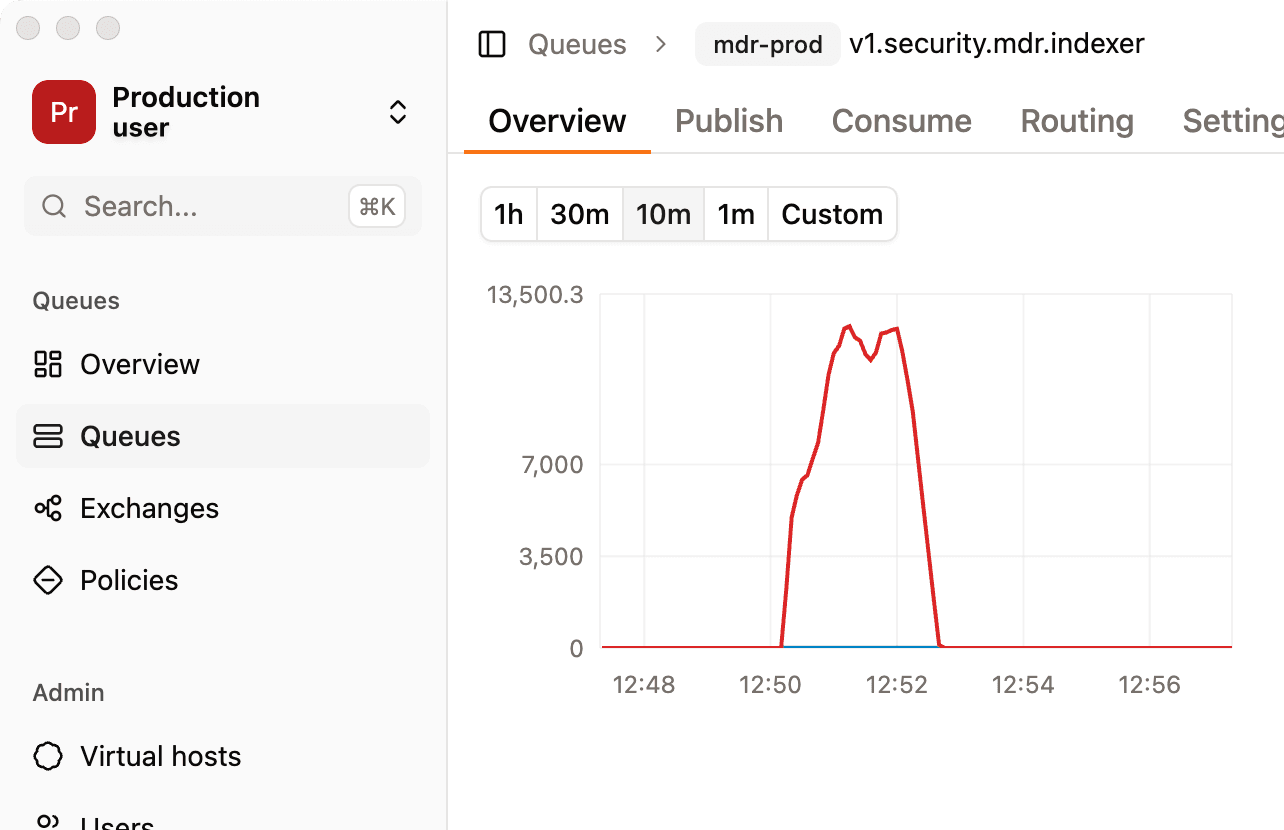
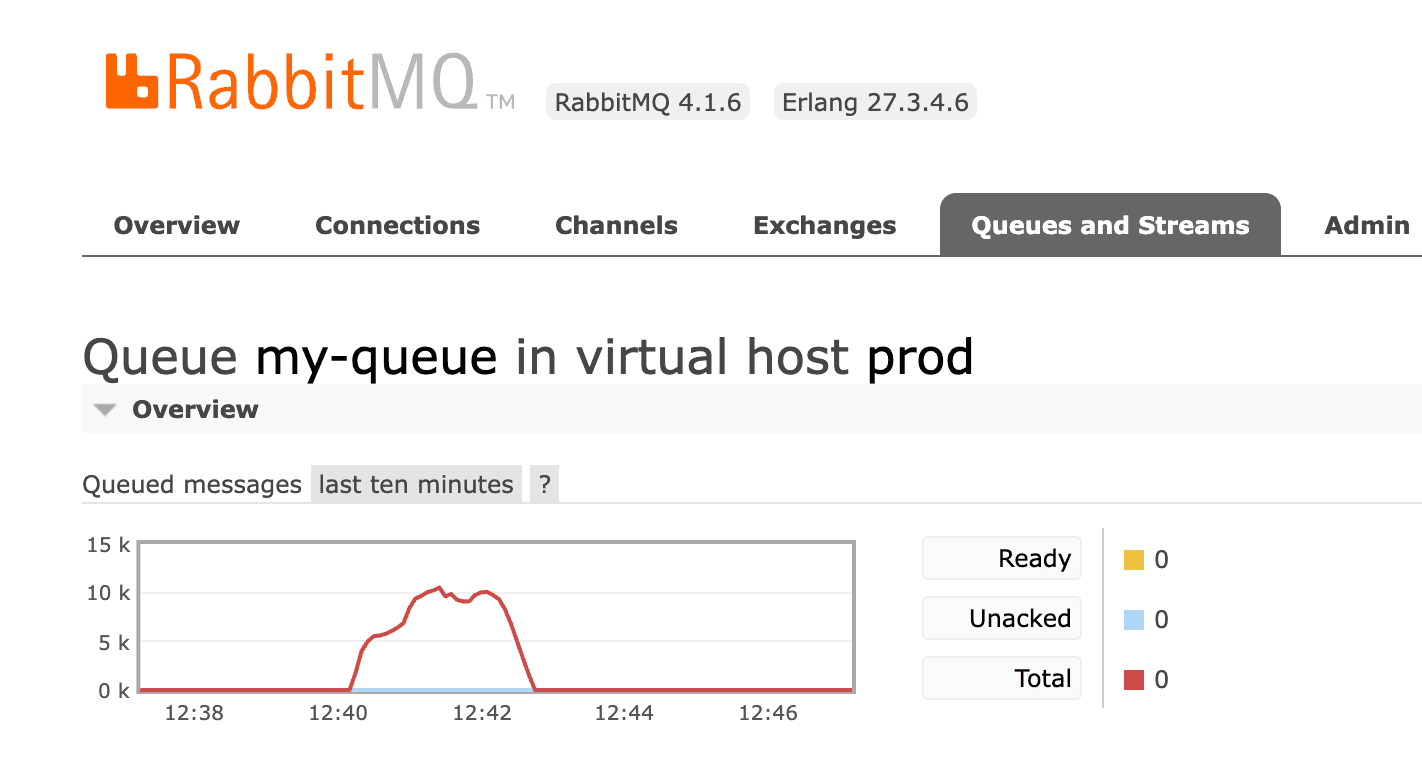
Note that when zooming in and out of the graph, RabbitGUI automatically selects the right granularity based on the window you are currently looking at. You can also over the graph to inspect values of different metrics. You may also visualize it using the built-in management plugin UI but the interaction is very limited:
Messages rate metrics
Message rates metrics are available under the body.message_stats object. Here are some of the most important ones:
ack: number of messages acknowledged by consumersdeliver: number of messages delivered to consumersdeliver_get: number of messages delivered to consumers or retrieved by clients using basic.getdeliver_no_ack: number of messages delivered to consumers with no-acknowledgmentget: number of messages retrieved by clients using basic.getget_empty: number of basic.get requests that returned no messagesget_no_ack: number of messages retrieved by clients using basic.get with no-acknowledgmentredeliver: number of messages redelivered to consumerspublish: number of messages published to the queue
Just like for the messages metrics, each rate metric has a corresponding *_details field that contains the time series data. For example, body.message_stats.publish_details.samples.
Note that the values for rate metrics are cumulative, meaning they only increase over time. To get the rate of change, you need to look at the rate field in the *_details object. And similarly, the samples array contains cumulative values, so you need to calculate the difference between consecutive samples to get the actual rate of change over time.
Keep in mind that if there is no activity on the queue during the specified time window, the message_stats object or some of its fields might be missing from the response.
Cluster-wide metrics
You can also query cluster-wide metrics using the GET /api/overview endpoint.
curl -u {username}:{password} {hostname}:15672/api/overviewQuery params
This endpoint supports the same 4 query parameters as the individual queue metrics endpoint but the valid values are usually different and allow you to go further back in time. For instance, you can usually use:
*_age=600and*_incr=5for a 10-minute window with 5-second increments*_age=3600and*_incr=60for a 1-hour window with 1-minute increments*_age=28800and*_incr=600for an 8-hour window with 10-minute increments*_age=86400and*_incr=1800for a 24-hour window with 30-minute increments
Response body
The object_totals field contains the total number of various objects in the cluster:
channels: total number of channelsconsumers: total number of consumersexchanges: total number of exchangesqueues: total number of queuesconnections: total number of connections
The queue_totals field contains the total number of messages in all queues:
messages: total number of messages in all queuesmessages_ready: total number of messages ready to be delivered to consumers across all queuesmessages_unacknowledged: total number of messages delivered to consumers but not yet acknowledged across all queues (same semantics as per-queuemessages_unacknowledged, see message acknowledgments)
Similar to the individual queue metrics, each of these fields has a corresponding *_details field that contains the time series data. For example, body.queue_totals.messages_details.samples contains the number of messages across all queues over time.
Rates can be found in the message_stats object, all with their corresponding *_details fields:
ack: number of messages acknowledged by consumersconfirm: number of messages confirmed by publishersdeliver: number of messages delivered to consumersdeliver_get: number of messages delivered to consumers or retrieved by clients using basic.getdeliver_no_ack: number of messages delivered to consumers with no-acknowledgmentdisk_reads: number of messages read from diskdisk_writes: number of messages written to diskdrop_unroutable: number of unroutable messages droppedget: number of messages retrieved by clients using basic.getget_empty: number of basic.get requests that returned no messagesget_no_ack: number of messages retrieved by clients using basic.get with no-acknowledgmentpublish: number of messages published to the clusterredeliver: number of messages redelivered to consumersreturn_unroutable: number of unroutable messages returned to publishers
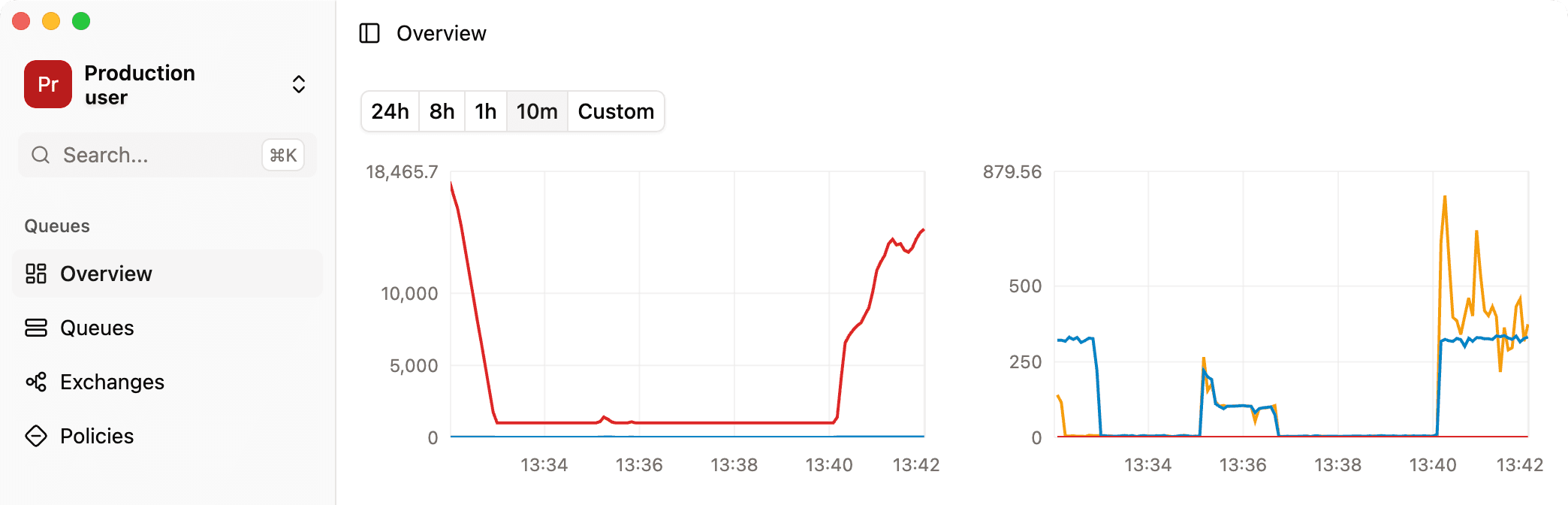
Again, all those data are used by RabbitGUI to display cluster-wide metrics over time from the overview tab where you can zoom in and out of the graphs as needed: