
Can you read a RabbitMQ message without consuming it?
Not in the way you probably want. RabbitMQ is a message broker, not a database. A queue is a delivery pipeline, and the only protocol-level way to look at a message is to have it delivered to you, either with basic.get (pull one message) or basic.consume (subscribe). Both hand you the message and mark it as unacknowledged until you decide what happens next.
There is no SELECT * FROM queue. There is no cursor, no offset, no "peek at message number 42". AMQP 0-9-1 simply does not define a read-only browse operation, and RabbitMQ does not add one.
What you can do is take delivery of a message and then put it back. That is what every "browse" feature in the RabbitMQ ecosystem does under the hood, including the management UI. It works, but it is not free: putting a message back has observable side effects that are worth understanding before you do it on a production queue.
What the management UI's "Get messages" really does
Open a queue in the management UI and you will find a "Get messages" panel. You pick a number of messages and an ack mode, click "Get messages", and the payloads appear on screen.
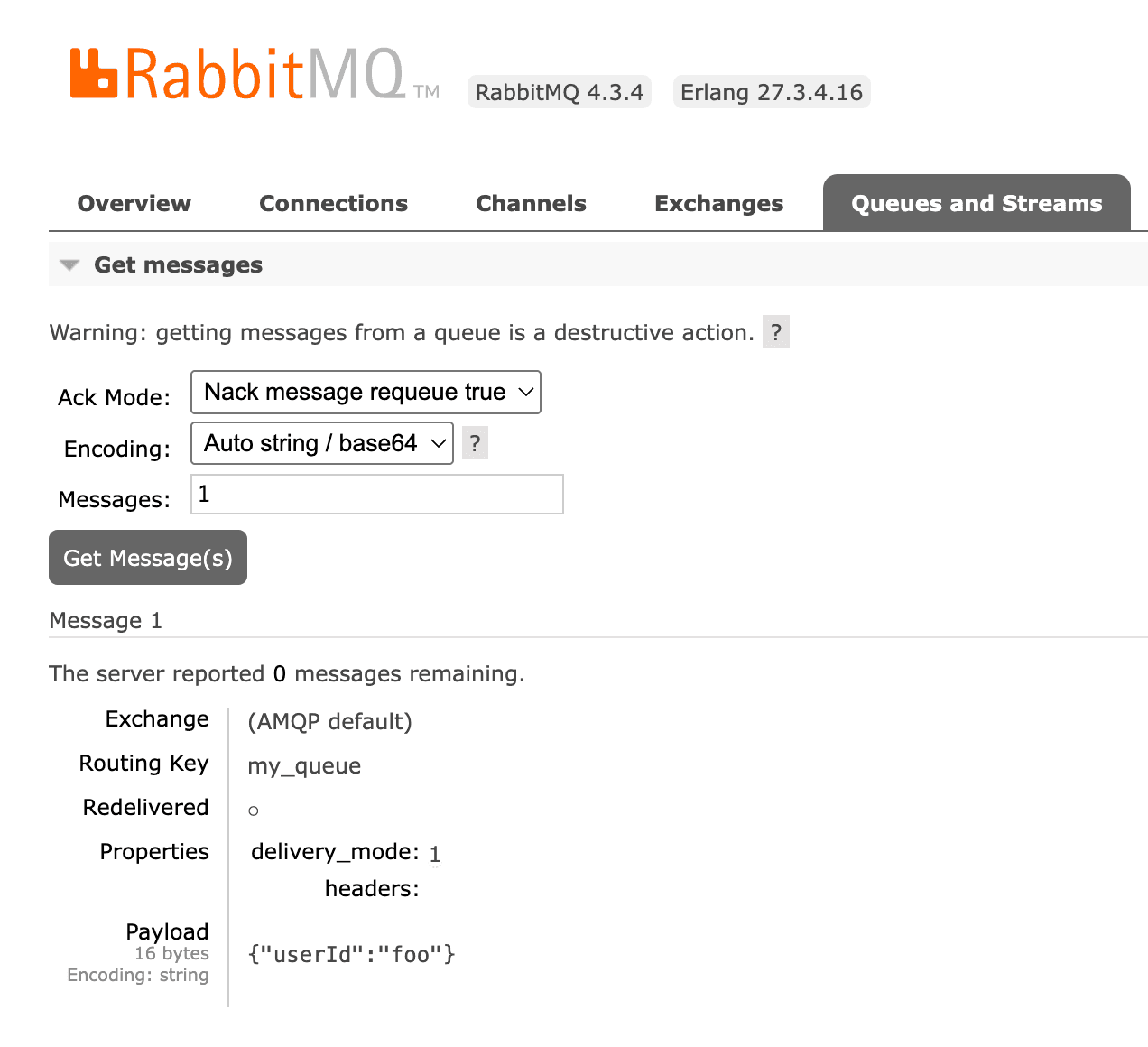
Behind that button is an HTTP endpoint that performs basic.get in a loop:
POST /api/queues/%2F/my-queue/get
{
  "count": 10,
  "ackmode": "ack_requeue_true",
  "encoding": "auto",
  "truncate": 50000
}
The ackmode parameter is the important one:
| Ack mode | What happens to the message |
|---|---|
ack_requeue_true | Delivered to you, then requeued. The message stays in the queue. |
reject_requeue_true | Delivered to you, then rejected with requeue. Also stays in the queue. |
ack_requeue_false | Delivered to you and removed permanently. |
reject_requeue_false | Delivered to you and rejected without requeue: removed, or dead-lettered if the queue has a dead-letter exchange. |
The two requeue_true modes are the closest thing RabbitMQ offers to browsing. The two requeue_false modes destroy data, and the management UI will happily let you pick them by accident. If you only want to look, make sure the requeue option is the one selected.
Also worth knowing: truncate means large payloads are cut off in the response, so what you see in the UI is not always the full message.
The side effects of requeueing a message
"Get and requeue" is not a read-only operation. The broker records that a delivery happened, and several things change:
The redelivered flag is set. Every message you browse comes back to your consumers with redelivered=true. If your application uses that flag to detect retries, route to a different code path, or emit a warning, browsing will trigger it.
Delivery counters increase on quorum queues. Quorum queues track a delivery count per message and expose it as the x-delivery-count header. Requeueing bumps that counter. If the queue has a delivery-limit policy, messages you browse are that much closer to being dead-lettered or dropped, and browsing the same queue repeatedly can push them over the limit. This is the sharpest edge of the whole technique, and it is easy to miss because nothing warns you.
Ordering is not guaranteed. A requeued message goes back towards the front of the queue, but "towards the front" is not "the exact position it came from". With multiple consumers or multiple in-flight messages, the relative order after a browse can differ from the order before it.
You only ever see the head of the queue. basic.get pulls from the front. To reach the hundredth message you must first pull ninety-nine others, and while you hold them unacknowledged they are invisible to your real consumers. Browsing deep into a large backlog is not practical, and the management UI caps how much it will fetch for exactly that reason.
Streams do not support it at all. Stream queues reject basic.get, they are read with a consumer and an offset instead. If you are working with streams, see everything you need to know about RabbitMQ streams.
Browsing messages with RabbitGUI
RabbitGUI packages both approaches so you do not have to write throwaway scripts.
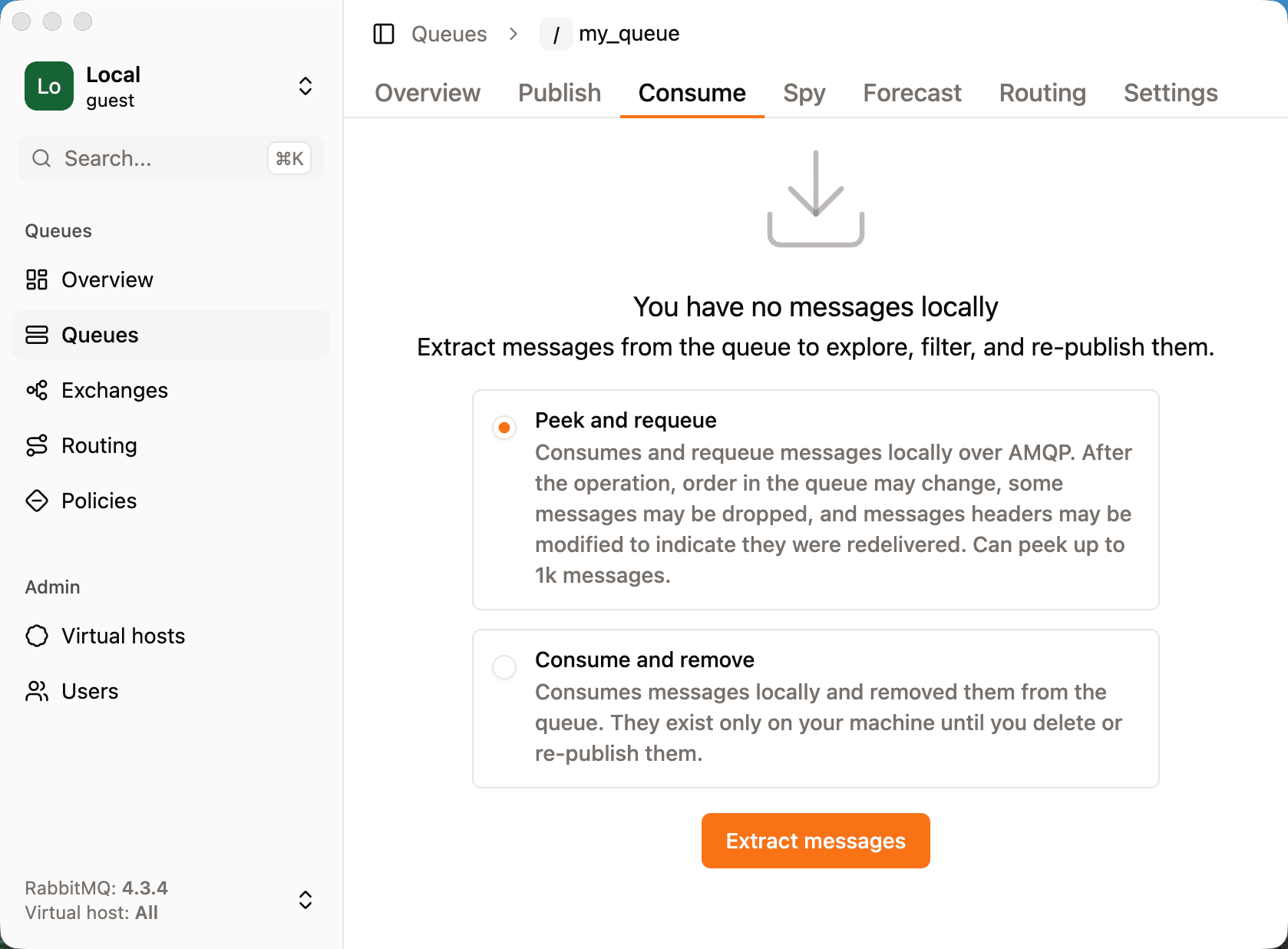
Open a queue, go to the "Consume" tab, and choose how you want to extract messages:
- Peek and requeue prefetches messages, stores them in a local database on your machine, then nacks them back to RabbitMQ. Messages stay in the queue. Because it reads from the head, it is limited to the first 1000 messages, and it carries the requeue side effects described above.
- Consume and remove takes messages out of the queue and keeps them locally. There is no depth limit, and no requeue side effects, but the messages are gone from the broker until you re-publish them.
Either way the messages end up in a local store, so inspecting them costs the broker nothing. Every message keeps its routing key, headers, properties, and payload, and RabbitGUI marks the ones that no longer exist in RabbitMQ with a "Local" badge so you always know what is still on the broker.
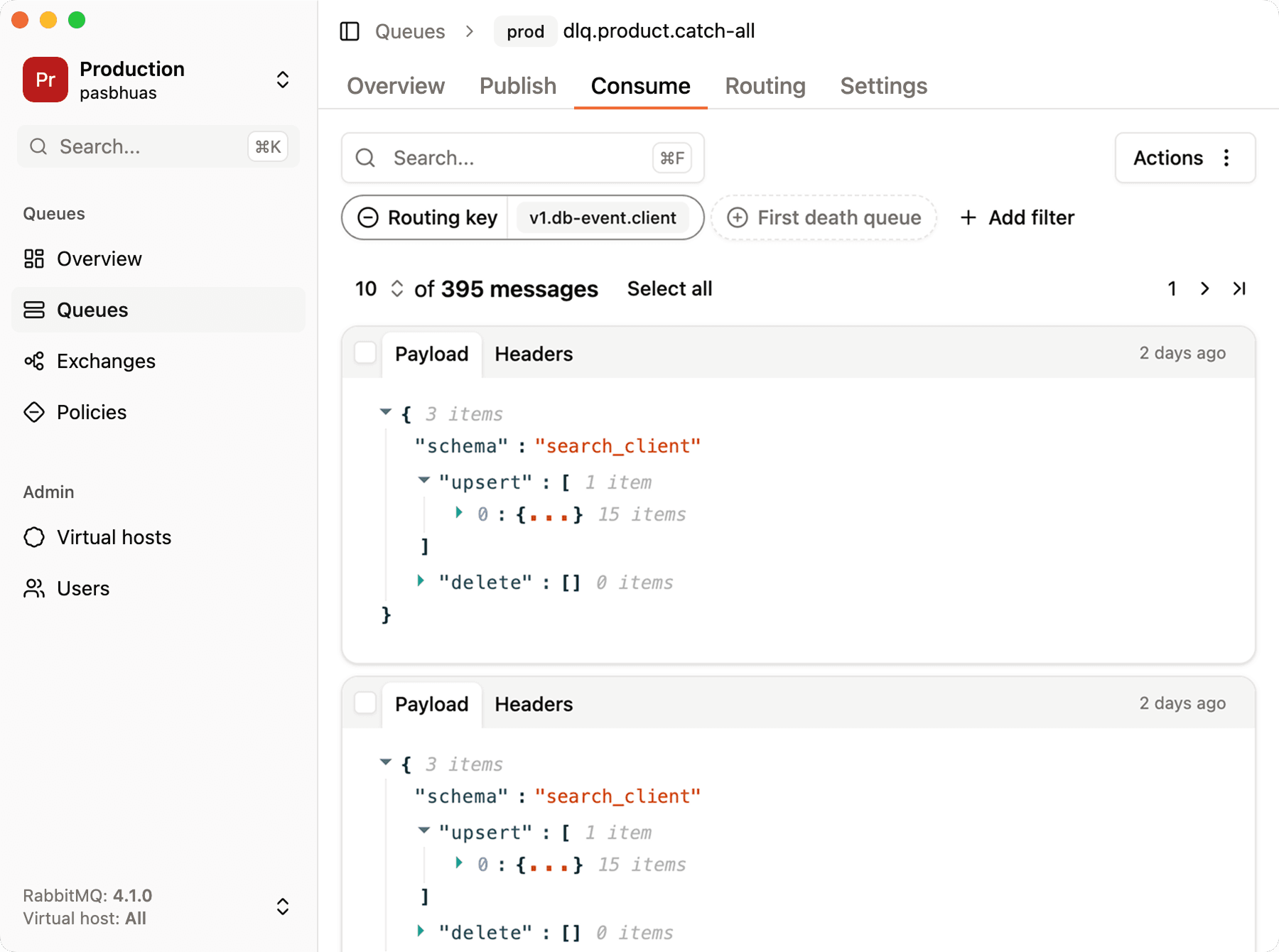
From there you can filter on any property, routing key, exchange, death count, header value, to find the one message you are looking for, or to get a breakdown of what a backlog is actually made of. Messages you consumed can be sent back with the re-publish flow, with optional throttling so you do not flood a downstream service.
Browsing from the CLI with rabbitmqadmin
The same endpoint is available from rabbitmqadmin, which is handy when you are on a server without a browser:
rabbitmqadmin get queue=my-queue count=5 ackmode=ack_requeue_trueThe same rules apply, because it is the same mechanism. ackmode defaults to a destructive value in some versions of the tool, so always pass it explicitly rather than trusting the default. Everything the management HTTP API exposes is described in the RabbitMQ monitoring API guide.
Writing your own browser with a consumer
If you need more control, for example to filter on a header or to scan more messages than the UI will fetch, you can write a short consumer that acknowledges nothing and rejects everything back into the queue. Here it is with amqplib in Node.js:
const channel = await connection.createChannel();
await channel.prefetch(50);

const seen: unknown[] = [];

await channel.consume("my-queue", (msg) => {
  if (!msg) return;

  seen.push({
    routingKey: msg.fields.routingKey,
    redelivered: msg.fields.redelivered,
    headers: msg.properties.headers,
    body: msg.content.toString(),
  });

  // put it back
  channel.nack(msg, false, true);
});
Two things to keep in mind. First, nack with requeue=true carries all the side effects described above, so this is not a read-only scan either. Second, the requeued message is immediately eligible for redelivery, and your own consumer is still subscribed, so you will receive the same messages again in a loop. You need to track what you have already seen (by message_id, by a hash of the payload, or simply by counting) and cancel the consumer once you have collected enough.
This is also why a naive browse loop can generate a surprising amount of broker load: the same handful of messages cycles through delivery and requeue as fast as the network allows. Set a prefetch, and stop when you are done. If acknowledgements are still fuzzy, RabbitMQ message acknowledgment explained covers the model in detail.
Watching new messages instead of browsing old ones
Sometimes "browse the queue" really means "show me what is arriving right now". That is a different problem, and it has a cleaner solution: bind a temporary queue to the same exchanges and routing keys as the queue you care about, and consume from that copy. Your application's queue is untouched, and the copy disappears when you disconnect if you declare it as exclusive and auto-delete.
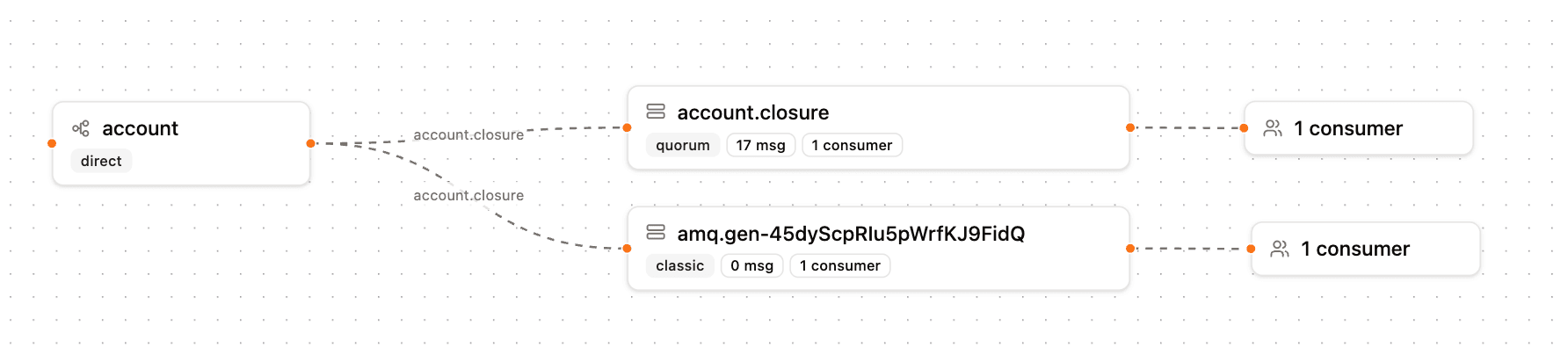
This gives you a live feed with zero impact on delivery counts, ordering, or the redelivered flag, because you never touch the original messages. The trade-off is that you only see traffic from the moment you start watching, never the existing backlog, and messages published directly to a queue through the default exchange cannot be mirrored this way. How to spy on real-time queue traffic in RabbitMQ explains the mechanism and its limits in full.
Which method should you use?
| You want to | Use |
|---|---|
| Search or filter a whole backlog, then decide what to re-publish | Extract to a local store with RabbitGUI |
| Glance at the first few messages, quick and dirty | Just use RabbitGUI or the Management UI "Get messages" with a requeue ack mode |
| Script it on a server | rabbitmqadmin get with an explicit ackmode |
| See what is arriving right now, with no side effects | The spy feature of RabbitGUI, or a temporary queue bound to the same exchanges |
The one rule that applies to all of them: on a production queue, prefer the options that do not touch delivery counters, and check whether a delivery-limit policy is in play before you start requeueing. Dead-lettering a message because you wanted to look at it is a bad trade.
If the messages you are chasing have already failed, how to introspect dead-letter queues in RabbitMQ picks up where this article ends, and the RabbitMQ retry pattern explains how to keep them from piling up in the first place.