RabbitMQ exponential backoff: how to retry messages with increasing delays
October 4, 2026•13 min read•RabbitMQ tutorial

What is exponential backoff in RabbitMQ?
Exponential backoff means waiting progressively longer between retries of a failed message, for example 5 seconds, then 15 seconds, then 60 seconds, instead of immediately requeueing it. After the last attempt, the message goes to a dead-letter queue (DLQ) instead of being retried forever.
RabbitMQ has no built-in backoff setting, but you can build it with standard features:
- One retry queue per delay, each with a message TTL (
x-message-ttl) and no consumer. - A dead-letter exchange on each retry queue that sends expired messages back to the work queue.
- A retry counter header (
x-retry-count) that your consumer reads to pick the next delay. - A final dead-letter queue for messages that are still failing after the last delay.
This article walks through a complete Node.js implementation. For an overview of every retry option in RabbitMQ (fixed delays, requeue, quorum queue delivery limits), see the RabbitMQ retry pattern guide.
Why use exponential backoff in RabbitMQ?
The default reaction to a failed message is often to requeue it:
channel.nack(msg, false, true);With requeue=true, RabbitMQ puts the message back at the head of the queue and redelivers it almost immediately. If the failure is caused by a database that is down or an API that is rate limiting you, the message fails again a few milliseconds later, and again, and again. The consumer burns CPU, the logs fill up, and the message never gets a chance to succeed because the dependency never gets a chance to recover. On classic queues this loop never ends. On quorum queues, the delivery-limit eventually stops it, but still without any delay between attempts.
A delayed retry fixes the timing problem. Exponential backoff goes one step further: each failure makes the next wait longer.
- Short first delay: most transient failures (a timeout, a lock, a restarting pod) resolve within seconds, so the first retry should come quickly.
- Longer later delays: if a message has already failed twice, the problem is probably not momentary. Waiting longer reduces load on a struggling dependency instead of hammering it.
- A bounded total: after N attempts the message stops retrying and goes to a DLQ, where someone can look at it.
The difference between ack, nack and reject, and what requeue does, is covered in RabbitMQ message acknowledgment explained.
How RabbitMQ exponential backoff works
The idea is to move failed messages out of the work queue and park them in a retry queue whose TTL is the delay you want. Retry queues have no consumers. When a message's TTL expires, RabbitMQ dead-letters it to the exchange configured on the retry queue, which routes it back to the work queue for another attempt.
With three retry tiers, a message that keeps failing goes through this sequence:
| Attempt | Where the message comes from | If it fails |
|---|---|---|
| 1 | Original publish | Republish to retry_5000ms, x-retry-count: 1 |
| 2 | retry_5000ms, after 5s | Republish to retry_15000ms, x-retry-count: 2 |
| 3 | retry_15000ms, after 15s | Republish to retry_60000ms, x-retry-count: 3 |
| 4 | retry_60000ms, after 60s | Publish to dead_letter_queue |
Four processing attempts over roughly 80 seconds, then a DLQ. While a message waits in a retry queue, the work queue keeps flowing: other messages are not blocked behind the failing one.
Why one retry queue per delay?
You might be tempted to use a single retry queue and set a different per-message expiration on each retry. Don't. RabbitMQ only expires messages at the head of a queue. A message with a 60-second expiration at the head blocks a 5-second message behind it, which then waits 60 seconds too. Giving each delay its own queue, with a queue-level TTL, guarantees every message in that queue has the same delay, so they expire in order.
RabbitMQ exponential backoff with TTL queues
Here is a complete example with amqplib. It uses three exchanges, all direct (see RabbitMQ exchange types explained):
work_exchange: where producers publish, routes towork_queue.retry_exchange: where the consumer publishes failed messages, routes to the retry queue matching the delay.dlx_exchange: where the consumer publishes messages that ran out of retries, routes todead_letter_queue.
Declaring the topology
import amqp from "amqplib";

const DELAYS = [5_000, 15_000, 60_000]; // 5s, 15s, 60s

const connection = await amqp.connect("amqp://localhost:5672");
const channel = await connection.createConfirmChannel();

// Final dead-letter queue
await channel.assertExchange("dlx_exchange", "direct", { durable: true });
await channel.assertQueue("dead_letter_queue", { durable: true });
await channel.bindQueue("dead_letter_queue", "dlx_exchange", "dead");

// Work queue
await channel.assertExchange("work_exchange", "direct", { durable: true });
await channel.assertQueue("work_queue", {
  durable: true,
  // Safety net: anything rejected without requeue lands in the DLQ
  deadLetterExchange: "dlx_exchange",
  deadLetterRoutingKey: "dead",
});
await channel.bindQueue("work_queue", "work_exchange", "work");

// One retry queue per delay
await channel.assertExchange("retry_exchange", "direct", { durable: true });

for (const delay of DELAYS) {
  const queue = `retry_${delay}ms`;
  await channel.assertQueue(queue, {
    durable: true,
    messageTtl: delay,
    deadLetterExchange: "work_exchange",
    deadLetterRoutingKey: "work",
  });
  await channel.bindQueue(queue, "retry_exchange", queue);
}
messageTtl and deadLetterExchange are amqplib's names for the x-message-ttl and x-dead-letter-exchange queue arguments. You can also set them with a policy instead of in code, which lets you change delays without redeclaring queues. Queue arguments can't be changed on an existing queue: redeclaring retry_5000ms with a different TTL fails with a PRECONDITION_FAILED error. Naming queues after their delay avoids that problem, since a new delay means a new queue.
deadLetterRoutingKey: "work" replaces the message's routing key when it is dead-lettered, so it only goes back to work_queue. This matters if your work exchange is a shared topic or fanout exchange with several queues bound to it: without a dedicated routing key, a retried message would be delivered to every bound queue again, not just the one that failed.
The consumer
const MAX_RETRIES = DELAYS.length;

await channel.prefetch(10);

channel.consume("work_queue", async (msg) => {
  if (!msg) return;

  const headers = msg.properties.headers ?? {};
  const retryCount = Number(headers["x-retry-count"] ?? 0);

  try {
    await processOrder(JSON.parse(msg.content.toString()));
    channel.ack(msg);
  } catch (err) {
    try {
      if (retryCount >= MAX_RETRIES || isPermanentError(err)) {
        await republish(msg, "dlx_exchange", "dead", {
          ...headers,
          "x-retry-count": retryCount,
          "x-error": String(err?.message ?? err),
          "x-failed-at": new Date().toISOString(),
        });
      } else {
        const delay = DELAYS[retryCount];
        await republish(msg, "retry_exchange", `retry_${delay}ms`, {
          ...headers,
          "x-retry-count": retryCount + 1,
        });
      }
      channel.ack(msg);
    } catch {
      // Republish not confirmed: requeue so the message isn't lost
      channel.nack(msg, false, true);
    }
  }
});

async function republish(msg, exchange, routingKey, headers) {
  channel.publish(exchange, routingKey, msg.content, {
    persistent: true,
    contentType: msg.properties.contentType,
    messageId: msg.properties.messageId,
    correlationId: msg.properties.correlationId,
    headers,
  });
  await channel.waitForConfirms();
}
A few details worth calling out:
- Ack after republish, not before. The consumer only acks the original once the broker has confirmed the copy (
createConfirmChannel+waitForConfirms). If the process crashes in between, the worst case is a duplicate retry, not a lost message. Make your handler idempotent. - Republish instead of
nack.nackcan't change headers, so the counter couldn't be incremented. Republishing gives you full control over headers and routing. - Keep message properties.
messageId,correlationIdandcontentTypearen't copied automatically when you republish. Losing them makes failed messages much harder to trace. persistent: truekeeps retried messages on disk, like the original. Retry queues should be durable for the same reason.
Tracking retry attempts
The backoff logic depends entirely on the retry counter: it decides which delay comes next and when to stop. RabbitMQ doesn't count attempts for you on classic queues, so the counter travels with the message in a custom header.
Incrementing x-retry-count
Every time a message fails, the consumer:
- Reads
x-retry-countfrommsg.properties.headers, defaulting to0for a first attempt. - Uses it as the index into the
DELAYSarray:0maps to 5s,1to 15s,2to 60s. - Republishes the message with
x-retry-count + 1.
Dead-lettering preserves message headers, so when the message comes back from retry_15000ms, x-retry-count is still there with the value you set. Because the counter is part of the message, it survives consumer restarts and works across any number of consumers.
What about x-death?
Each time a message is dead-lettered, RabbitMQ adds or updates an entry in the x-death header, with a count per queue and reason. Since every retry here goes through dead-lettering on TTL expiry, you could compute the attempt number by summing those counts:
const deaths = headers["x-death"] ?? [];
const attempts = deaths
  .filter((d) => d.reason === "expired")
  .reduce((sum, d) => sum + Number(d.count), 0);
It works, but it's harder to read, and it breaks as soon as a message is moved some other way (manually re-published from a DLQ, for example). An explicit x-retry-count header is easier to reason about and to filter on when you inspect queues. The retry pattern guide compares all the counter options, including quorum queues' x-delivery-count.
Choosing retry delays
There is no universal schedule. The total time covered by your retries should be longer than the time the failing dependency typically needs to recover, and shorter than the time after which the message becomes useless.
Common schedules:
| Delays | Total wait | Good for |
|---|---|---|
| 1s → 5s → 15s | ~21s | Lock contention, deadlocks, optimistic concurrency conflicts |
| 5s → 15s → 60s | ~80s | Network blips, timeouts, a pod restarting |
| 10s → 30s → 2m → 5m | ~7.5 min | Downstream API outages, deployments, failovers |
| 1m → 5m → 15m → 1h | ~1h20 | Third-party rate limits, scheduled maintenance windows |
These are rounded versions of the classic formula delay = base × factor^attempt. With a base of 5s and a factor of 3, you get 5s, 15s, 45s, 135s. Since each delay needs its own queue with a fixed TTL, round to values you'll recognize in a queue list: retry_60000ms is easier to reason about than retry_45000ms.
Backoff should depend on the failure type
Not every error deserves the same schedule. Classify errors in your consumer and route them accordingly:
| Failure | Retry? | Suggested approach |
|---|---|---|
| Invalid JSON, schema validation error, missing field | No | Straight to the DLQ, retrying can't fix it |
| Business rule violation (order already cancelled) | No | Ack and log, or DLQ if it needs a human |
| Timeout, connection reset, 503 | Yes | Short backoff: 5s → 15s → 60s |
| HTTP 429 rate limited | Yes | Longer backoff, or the tier closest to the Retry-After value |
| Database deadlock or lock timeout | Yes | Short delays, few attempts |
| Dependency down for maintenance | Yes | Long backoff: minutes, not seconds |
In the consumer above, isPermanentError(err) is where this classification lives. Sending permanent failures to the DLQ immediately saves three retry cycles and makes the DLQ more useful: a validation error arrives there in milliseconds instead of 80 seconds.
If different message types need very different schedules, declare separate sets of retry queues (orders.retry_5000ms, emails.retry_60000ms...) rather than one schedule shared by everything.
Watch out for retry storms
When a dependency goes down, every message fails at roughly the same time, waits the same 5 seconds in the same queue, and comes back at the same time. Queue-level TTLs can't add random jitter to spread retries out. In practice, this is acceptable for most systems because consumers process at their own pace with prefetch, but if the burst is large, keep the first tier short and add more tiers rather than relying on one very long delay. If you need per-message jitter, the delayed message exchange (below) supports it.
What happens after the maximum retries?
When x-retry-count reaches the number of delay tiers, the consumer stops retrying and publishes the message to dlx_exchange, which routes it to dead_letter_queue. A DLQ is not a trash can: messages stay there, untouched, until someone inspects them, fixes the cause, and replays or discards them.
Make dead messages easy to understand by adding context headers before publishing to the DLQ:
x-retry-count: confirms the message went through all retry tiers.x-error: the last error message.x-failed-at: when it was moved to the DLQ.- The original headers (
...headers): correlation IDs, tenant IDs, trace IDs.
work_queue is also declared with dlx_exchange as its own dead-letter exchange. That way, if any code path rejects a message without requeueing (nack(msg, false, false)), it still ends up in the DLQ instead of being dropped.
Two things to set up around the DLQ:
- Alerting. A DLQ should be empty in a healthy system. Alert on its message count, see monitoring RabbitMQ with the HTTP API.
- Replay. Once the cause is fixed, messages need to go back to
work_exchange. Resetx-retry-countto0when you do, otherwise a replayed message goes straight back to the DLQ on its first failure.
For the broker-side setup of dead-lettering, with policies instead of hard-coded queue arguments, read setting up dead-letter queues properly.
Exponential backoff vs delayed message exchange
The delayed message exchange plugin is the other way to delay retries. Instead of one queue per delay, you publish to an x-delayed-message exchange with an x-delay header, and the exchange holds the message until the delay expires.
| TTL retry queues | Delayed message exchange | |
|---|---|---|
| Plugin required | No | Yes, rabbitmq_delayed_message_exchange |
| Delays | Fixed set, one queue per delay | Any value, per message |
| Jitter | Not possible | Add randomness to x-delay |
| Visibility | Waiting messages visible in each retry queue | Hidden inside the exchange until delivered |
| Replication | Works with quorum queues | Delayed messages stored on a single node |
| Managed services | Works everywhere | Not available on every hosted RabbitMQ |
TTL retry queues are the safer default: they work on any RabbitMQ installation, they can be replicated, and you can see exactly how many messages are waiting in each tier. The delayed exchange is more flexible and makes per-message jitter easy, but adds a plugin to install and keeps pending messages on one node. The delayed messages guide covers installation and trade-offs in detail.
Inspecting retry queues with RabbitGUI
Once backoff is in place, most questions you'll have are about what is sitting in the retry queues and the DLQ: how many messages are waiting in each tier, which attempt they are on, and why they failed. The RabbitMQ Management UI only lets you fetch raw messages one at a time from the head of a queue, with no filtering (see how to browse RabbitMQ messages without consuming them).
RabbitGUI makes this workflow much faster.
See what's waiting in each retry queue
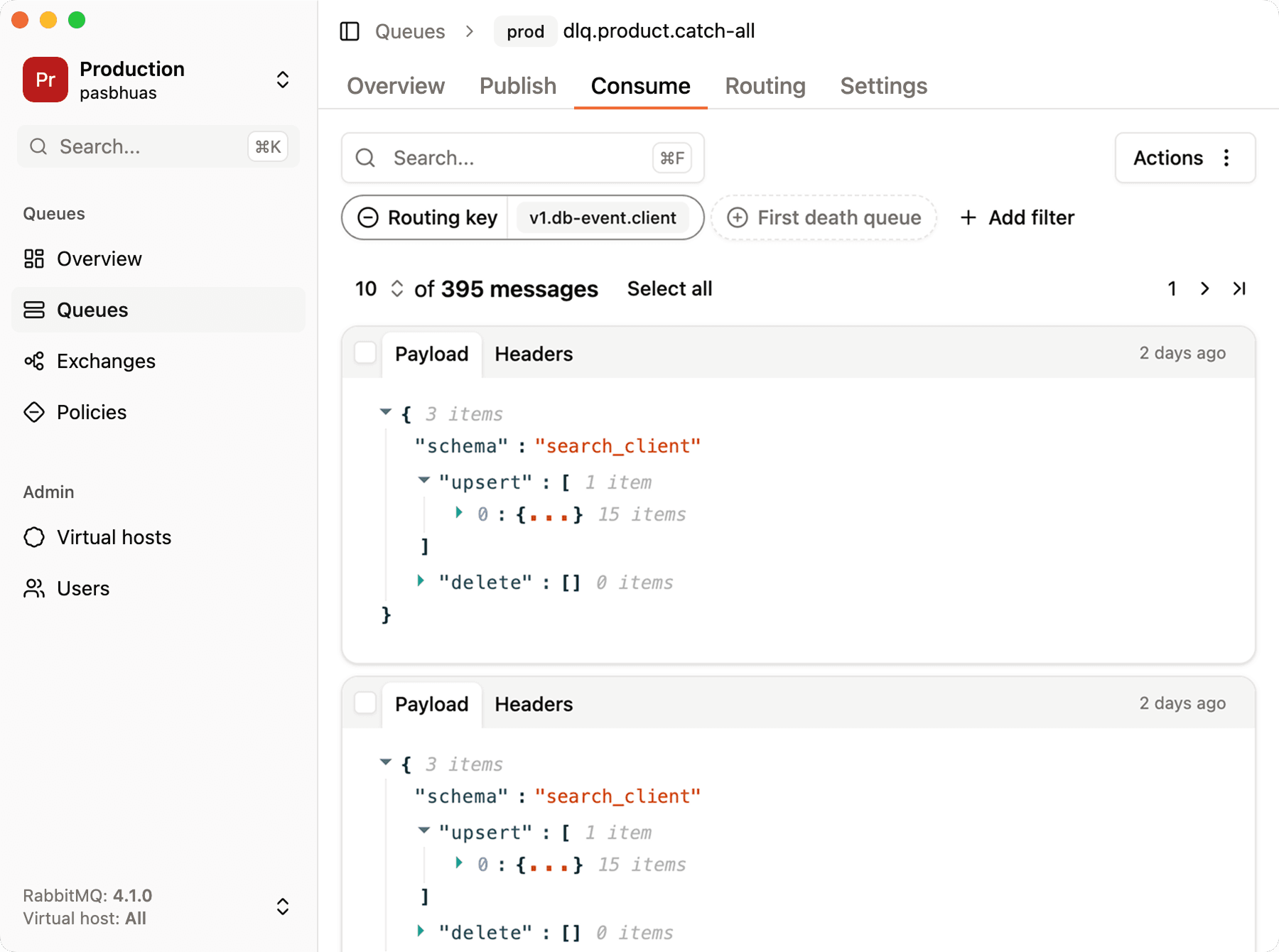
Open retry_5000ms, retry_15000ms or retry_60000ms and peek at their messages without removing them from the queue. A retry queue that keeps growing is an early sign that a dependency is struggling, before anything reaches the DLQ.
Check x-retry-count and the other headers
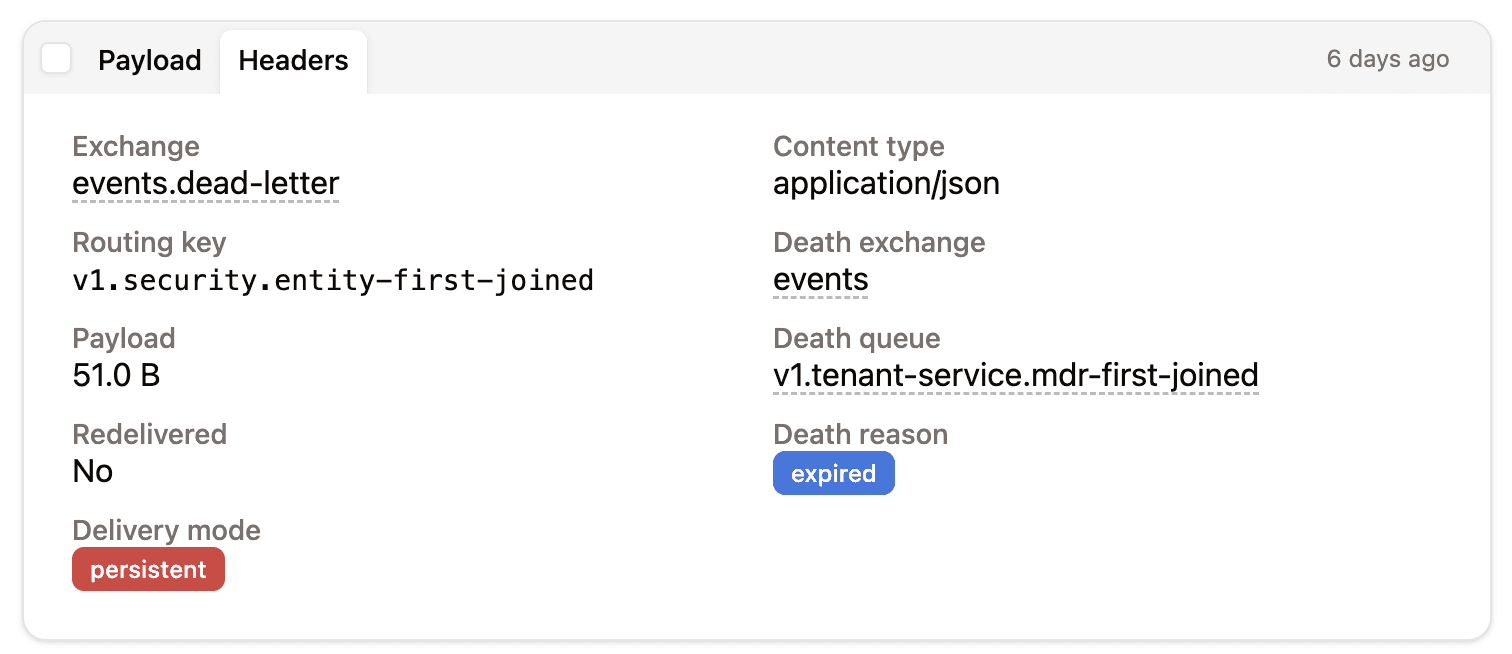
Open a message and go to the "Headers" tab to see x-retry-count, x-error and x-failed-at, alongside RabbitMQ's own x-death entries. It's the quickest way to confirm the backoff behaves as designed: a message in retry_15000ms should have x-retry-count: 2, and a message in the DLQ should have the maximum count and the last error.
Filter and replay the DLQ
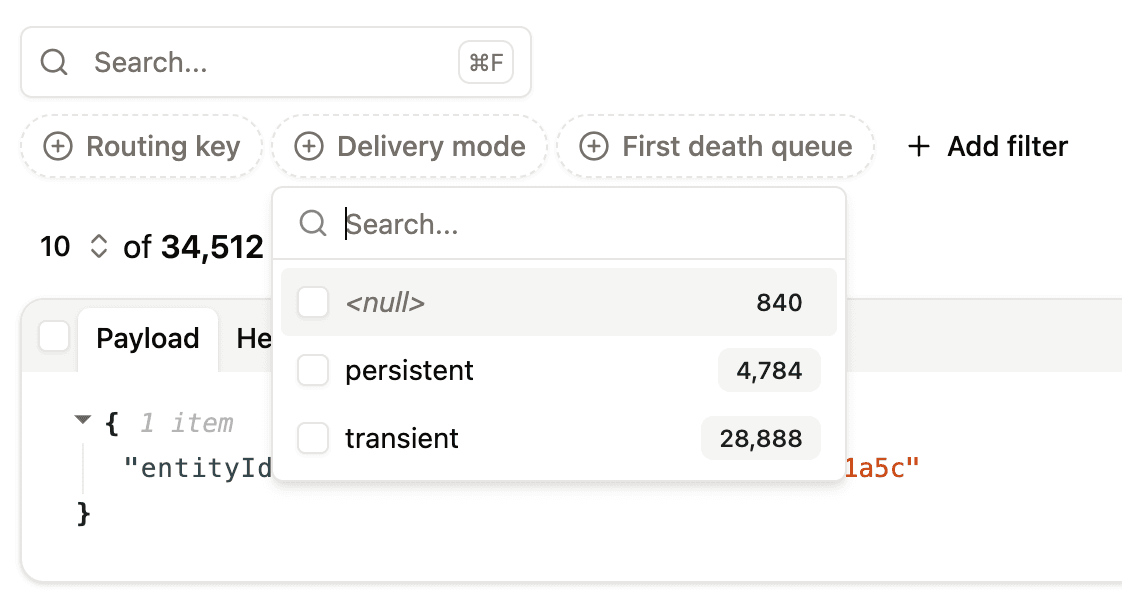
Filter messages in the DLQ on x-error, x-retry-count or the routing key to group failures by cause. Once the cause is fixed, select the messages and re-publish them to work_exchange (or any other exchange and routing key), throttling the rate so the replay doesn't overwhelm your consumers.
The full walkthrough is in how to introspect dead-letter queues in RabbitMQ.
FAQ
Does RabbitMQ support exponential backoff natively?
No. RabbitMQ has no retry or backoff setting. You build exponential backoff from message TTLs, dead-letter exchanges and a retry counter header, or with the delayed message exchange plugin.
How do I retry a RabbitMQ message with a delay?
Ack the failed message and republish it to a retry queue that has a x-message-ttl and a dead-letter exchange pointing back to the work queue. The message waits for the TTL, then RabbitMQ dead-letters it back for another attempt. For exponential backoff, use one retry queue per delay and pick the queue from the retry count.
How many retries should I use?
Three to five attempts is typical. Choose the number and delays so the total wait covers the expected recovery time of the failing dependency, for example 5s → 15s → 60s for short outages or 10s → 30s → 2m → 5m for longer ones.
Can I use one retry queue with per-message TTLs?
Not reliably. RabbitMQ only expires messages at the head of a queue, so a long-delay message blocks shorter-delay messages behind it. Use one queue per delay, or the delayed message exchange plugin.
What happens to a message after the last retry?
The consumer publishes it to a dead-letter queue with headers describing the failure. It stays there until someone inspects it, then replays or discards it. Reset the retry counter when replaying so it gets a full set of retries again.