Introduction
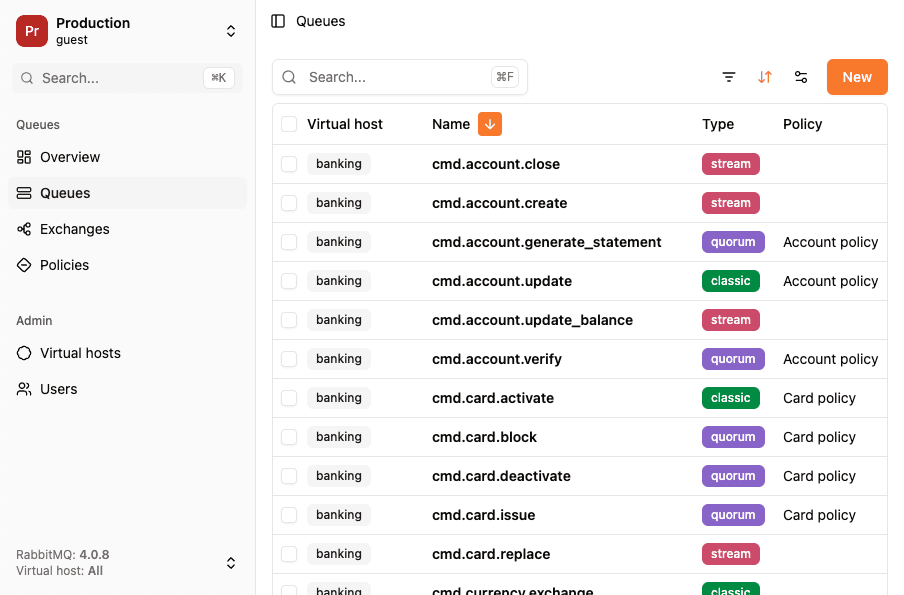
RabbitGUI is a desktop client for RabbitMQ that runs on macOS, Windows and Linux. It is built with Electron, and this article explains how the pieces fit together. The main process talks to RabbitMQ, exposes everything to the UI through a typed tRPC API, and stores messages in a local SQLite database. The renderer is a plain React app that never touches the network or the disk itself.
If you are building a developer tool on Electron, most of this applies to you too. None of it is specific to RabbitMQ.
Why a desktop app at all?
RabbitMQ already ships a web UI, the management plugin. We could have built another web app on top of the same HTTP API. We didn't, for three reasons:
- A browser can't speak AMQP. The management HTTP API is fine for listing queues and reading stats, but the interesting features need a real AMQP 0-9-1 connection over a raw TCP socket: consuming a whole queue, spying on live traffic, republishing thousands of messages with throttling. Browsers only get TCP through WebSockets, which would need an extra plugin on the broker. A Node.js process gets TCP sockets out of the box.
- No server in the middle. A hosted web app would need a backend that holds your broker credentials and can reach your private network. A desktop app connects from your machine directly to your broker, the same way your own services do. Credentials never leave your computer (more on that in how security is built into RabbitGUI).
- Local storage that can handle real volumes. Debugging a dead-letter queue often means looking at tens of thousands of messages. We wanted to copy them once and then search, filter and group them as often as needed without loading the broker again. That calls for a real database on disk, not
localStorage.
Electron gives us all three while keeping a single language, TypeScript, from the AMQP socket down to the React components.
The architecture in one picture
┌──────────────────────────── Electron app ────────────────────────────┐
│                                                                      │
│  Renderer process (Chromium)          Main process (Node.js)         │
│  ─────────────────────────            ──────────────────────         │
│  React 19                             tRPC router                    │
│  TanStack Router + Query   ── IPC ──▶ ├─ fetch  ──▶ Management API   │
│  tRPC client (ipcLink)     ◀───────── ├─ amqplib ─▶ AMQP 0-9-1       │
│  Monaco, React Flow,                  └─ Kysely + better-sqlite3     │
│  Recharts, Tailwind                        │                         │
│                                            ▼                         │
│                                    user-data.db (SQLite, WAL)        │
└──────────────────────────────────────────────────────────────────────┘
                                   │
                                   ▼
                         Your RabbitMQ broker(s)
The rule is simple: the renderer only renders. Anything that touches the network, the file system or a secret lives in the main process, and the renderer reaches it only through typed tRPC procedures.
The main process speaks two protocols
The management HTTP API
Most of what you see in RabbitGUI comes from the RabbitMQ management API: queues, exchanges, bindings, policies, users, vhosts and the message rate time series. In the main process it is just fetch with basic auth:
export const api = async <T>(path: string, { method = 'get', credentials, body }) => {
  const response = await fetch(credentials.baseUrl + path, {
    method,
    headers: {
      Authorization:
        'Basic ' +
        Buffer.from(`${credentials.username}:${credentials.password}`).toString('base64'),
      'Content-Type': 'application/json',
    },
    body: JSON.stringify(body),
  })

  if (!response.ok) {
    // Map RabbitMQ errors to typed tRPC errors (404 => NOT_FOUND, etc.)
  }

  return (await response.json()) as T
}
Since the request comes from Node.js and not from a web page, there is no CORS to configure on the broker. You point RabbitGUI at the same URL you would open in your browser, and it works.
The API is paginated, so the main process walks every page before returning. The renderer always receives the full list and can sort and filter it instantly:
const data = await queues(credentials, { page: 1, pageSize: 100 })

while (data.page_count > data.page) {
  const next = await queues(credentials, { page: data.page + 1, pageSize: 100 })
  data.items.push(...next.items)
  data.page = next.page
}
AMQP 0-9-1 with amqplib
The management API has a "get messages" endpoint, but the RabbitMQ docs describe it as a diagnostics tool for sysadmins: it does not implement reliable delivery and pulls messages one HTTP request at a time. For anything involving many messages we open a real AMQP connection with amqplib, still from the main process.
The live queue spy is a good example. To watch a queue without stealing messages from your consumers, RabbitGUI declares a temporary, exclusive queue and copies the bindings of the queue you are watching onto it. RabbitMQ then delivers a copy of each matching message to both queues:
const connection = await amqp.connect(amqpUrl)
const channel = await connection.createChannel()

// Server-named, exclusive, deleted when the connection closes
const { queue: tempQueue } = await channel.assertQueue('', {
  exclusive: true,
  autoDelete: true,
})

// Same bindings as the queue we are spying on
for (const binding of await queueBindings(credentials, { vhost, queue })) {
  if (binding.source) {
    await channel.bindQueue(tempQueue, binding.source, binding.routing_key, binding.arguments)
  }
}

await channel.consume(tempQueue, async (msg) => {
  if (!msg) return
  channel.ack(msg)
  await db.insertInto('consumed_messages').values(toRow(msg)).execute()
})
Because the spy queue is exclusive and auto-delete, closing the app or the connection removes it. Nothing is left behind on your broker.
The same idea powers browsing a queue without consuming it. RabbitGUI consumes the queue, writes every message to SQLite, and either requeues them or removes them, depending on the mode you pick. Requeued messages come back with the redelivered flag set, and on quorum queues with an incremented x-delivery-count. So we strip those headers and hash the body plus the remaining headers. If you extract the same queue twice, you don't get duplicates in the local database.
tRPC over Electron IPC
Electron's IPC is untyped. You ipcRenderer.invoke('some-channel', args) and hope the main process handles that string. With a few dozen features, that gets fragile fast. So we put tRPC on top of it with trpc-electron.
The main process defines ordinary tRPC routers, validated with zod:
export const queuesRouter = router({
  list: publicProcedure.input(z.string()).query(async ({ input: connexionId }) => {
    // management API + local SQLite counts
  }),
  purge: publicProcedure
    .input(z.object({ connexionId: z.string(), vhost: z.string(), queue: z.string() }))
    .mutation(async ({ input }) => {
      await purgeQueue(getCredentials(input.connexionId), { name: input.queue, vhost: input.vhost })
    }),
})

export const appRouter = router({
  connexions: connexionsRouter,
  queues: queuesRouter,
  exchanges: exchangesRouter,
  localMessages: localMessagesRouter,
  spy: spyRouter,
  // ...
})
export type AppRouter = typeof appRouter
It is wired to the window with a single call:
createIPCHandler({ router: appRouter, windows: [mainWindow] })The preload script exposes the bridge (exposeElectronTRPC()), and the renderer creates a client with an IPC link instead of an HTTP one:
export const trpcClient = createTRPCClient<AppRouter>({
  links: [ipcLink()],
})

export const trpc = createTRPCOptionsProxy<AppRouter>({
  client: trpcClient,
  queryClient,
})
What we get out of this:
- End-to-end types. The renderer imports only the
AppRoutertype. Renaming a procedure or changing an input breaks the renderer build, not the app at runtime. - TanStack Query for free. Every procedure becomes
useQuery(trpc.queues.list.queryOptions(connexionId)), with caching, refetch intervals, loading states and invalidation after mutations. Live dashboards are just arefetchInterval. - Typed errors. The main process maps RabbitMQ failures to
TRPCErrors. The renderer can, for example, skip retries on aNOT_FOUNDwhen a queue was deleted under your feet. - No channel names to maintain. There is not a single hand-written
ipcMain.handlefor app features.
Long-running jobs, like extracting 50,000 messages, don't block a request. The mutation starts the job in the main process and returns. The renderer polls a status query that reports progress until the job is done.
SQLite as the local source of truth
Messages you extract, spy on or publish go into a SQLite database in Electron's userData folder. We use better-sqlite3 with Kysely as a type-safe query builder:
const sqlite = new SQLite(path.join(app.getPath('userData'), 'user-data.db'))
sqlite.pragma('journal_mode = WAL')

export const db = new Kysely<DB>({
  dialect: new SqliteDialect({ database: sqlite }),
})
Schema changes ship as Kysely migrations defined in code and run at startup with migrator.migrateToLatest(), so a user who skips a few versions still ends up with the right schema. In development, kysely-codegen regenerates the DB type from the real database after each migration. Queries stay typed without maintaining types by hand.
The main table, consumed_messages, stores the payload, the AMQP properties, and a few columns lifted out of the headers for fast filtering: delivery count, and the first and last death exchange, queue and reason from x-death. Composite indexes on (connexionId, vhost, queue, …) keep filters and facet counts fast on large extractions.
Having the messages in SQL is what makes the dead-letter workflow possible:
- Filters, full-text search and facets ("how many messages per routing key or death reason?") are SQL queries, not something RabbitMQ can answer.
- You can republish a hand-picked subset, to its original queue or anywhere else, with throttling.
- The queue list joins live stats from the management API with local counts, so you can see which queues have messages saved on your machine.
The spy view keeps the newest 1,000 messages per queue and deletes older rows, so a busy queue can't fill your disk.
Small settings, like connections, saved table views and appearance, live in a JSON config file managed by electron-conf and not in SQLite.
The renderer: just a React app
Because everything heavy happens in the main process, the renderer is a regular single-page React app:
- React 19 with TanStack Router for file-based routes, and TanStack Query through the tRPC proxy.
- Tailwind CSS and Radix UI primitives for the interface.
- Monaco, the editor behind VS Code, for the JSON message editor.
- React Flow with elkjs for automatic layout of the routing graph of exchanges, bindings, queues and dead-letter paths.
- Recharts for the message rate charts and the drain-time forecast.
There is no API base URL to configure, no auth token to refresh, no CORS. The renderer could run in a browser tab against a different link without code changes, which also makes it easy to iterate on with hot reload through electron-vite.
Building and shipping
- electron-vite builds the main, preload and renderer bundles with Vite.
- electron-builder packages the app for macOS (Apple Silicon and Intel, signed and notarized), Windows and Linux. Linux builds run in the
electronuserland/builderDocker image. - better-sqlite3 is a native module, so it has to be compiled against Electron's Node ABI and not your system Node.
electron-builder install-app-depsruns onpostinstallto take care of that. It is the one part of the stack that occasionally needs attention after an Electron upgrade. - electron-updater checks for a new version a few seconds after launch and installs updates in the background.
Trade-offs we accepted
Electron isn't free. The download is bigger than a native app's, and an idle window uses more memory than a terminal tool would. For a tool you open to debug a broker, we think it's the right trade:
- One language and one type system from the AMQP consumer to the button that triggers it.
- Mature Node.js libraries for exactly what we need (amqplib, better-sqlite3), running in-process with no sidecar.
- The same codebase and UI on macOS, Windows and Linux.
Start your own app from a boilerplate
Wiring all of this by hand takes days: the IPC bridge, native module rebuilds, migrations, code signing, notarization and auto updates. If you want the same architecture for your own desktop app, start from a boilerplate instead.
We extracted the stack behind RabbitGUI into Electron AppStack, a free, production-ready Electron + TypeScript starter. It ships with React, tRPC over IPC, SQLite, auto updates and signed releases, plus documentation for each piece:
npx degit nick-keller/electron-appstack/template my-app
cd my-app
npm install
npm run dev
You get the main process / renderer split described in this article on day one, and can spend your time on the features that make your app different.
If you are curious what this architecture adds up to in practice, RabbitGUI is available for macOS, Windows and Linux, or have a look at what it does compared to the management UI.